> ## Documentation Index
> Fetch the complete documentation index at: https://www.adspirer.com/docs/llms.txt
> Use this file to discover all available pages before exploring further.
# Connect Claude Code to Ad Platforms | Adspirer
> Connect Claude Code to Adspirer MCP in 2 minutes. Manage Google Ads, Meta Ads, Amazon Ads, ChatGPT Ads, LinkedIn Ads, and TikTok Ads from your terminal with 400+ tools.
Manage all your ad campaigns from the terminal. One command to connect, 400+ tools to use.
**Adspirer is available on the Claude plugin marketplace.** Run `/plugin install adspirer-ads-agent@claude-community` directly, or type `/plugin`, open the **Discover** tab, and search for `adspirer` — you'll find `adspirer-ads-agent` from `claude-community`. No custom marketplace setup required. This is the recommended way to connect Adspirer to Claude Code.
## Prerequisites
* Claude Code installed:
```bash theme={"theme":{"light":"github-light","dark":"github-dark"}}
npm install -g @anthropic-ai/claude-code
```
* An Adspirer account ([free to start](https://adspirer.ai/sign-up?utm_source=docs\&utm_medium=page\&utm_content=signup))
* At least one ad platform account: Google Ads, Meta Ads, Amazon Ads, ChatGPT Ads, LinkedIn Ads, or TikTok Ads
* macOS or Linux (Windows requires WSL)
## Setup
### Install
One command installs the MCP connector, slash commands, skills, and the Performance Marketing Agent together.
The `/plugin` and `/mcp` commands below are **slash commands** — type them directly into the Claude Code input. Do not ask the AI to run them for you (that will cause a "nested session" error).
Run this directly from the command line:
```bash theme={"theme":{"light":"github-light","dark":"github-dark"}}
/plugin install adspirer-ads-agent@claude-community
```
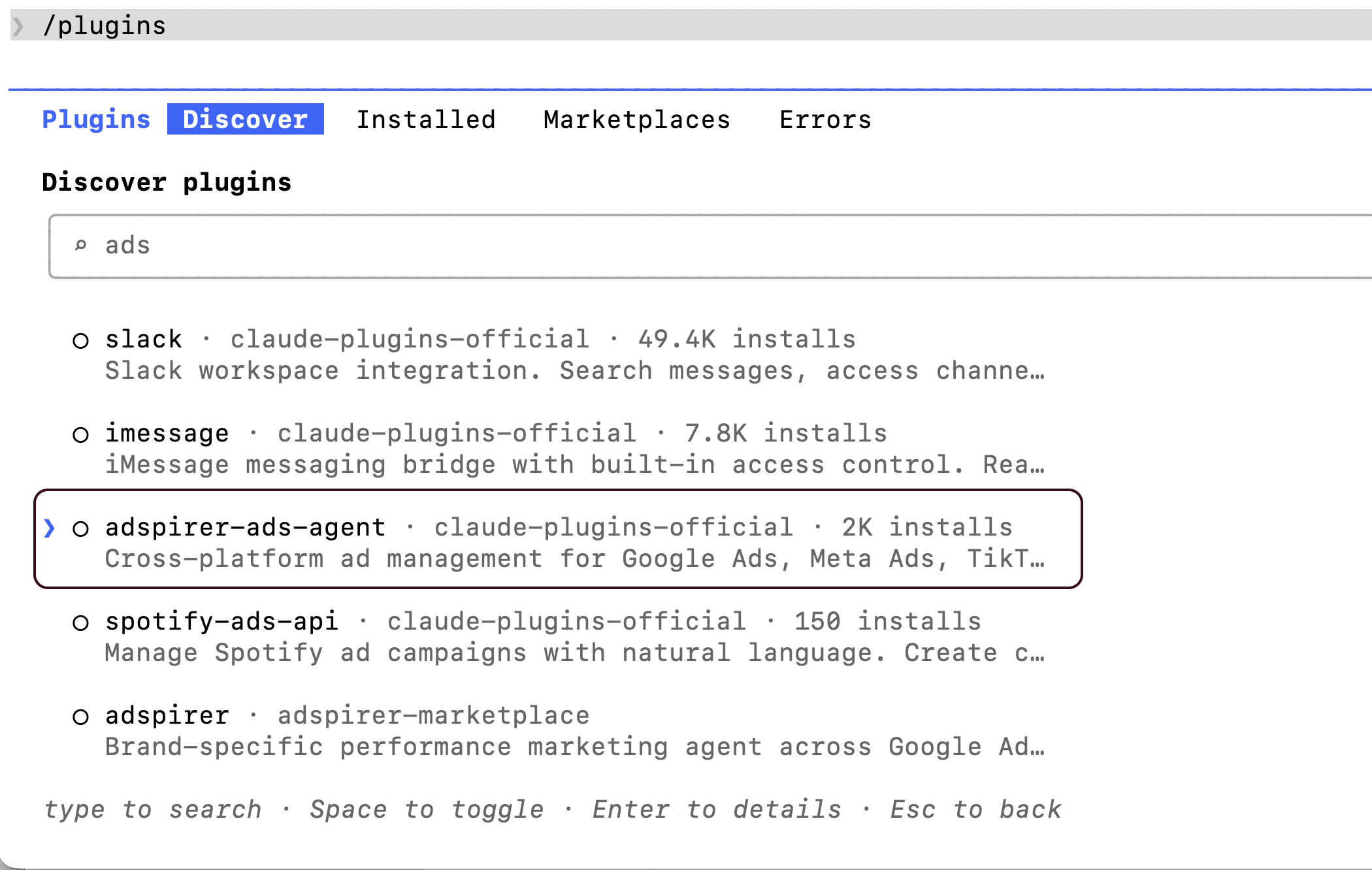
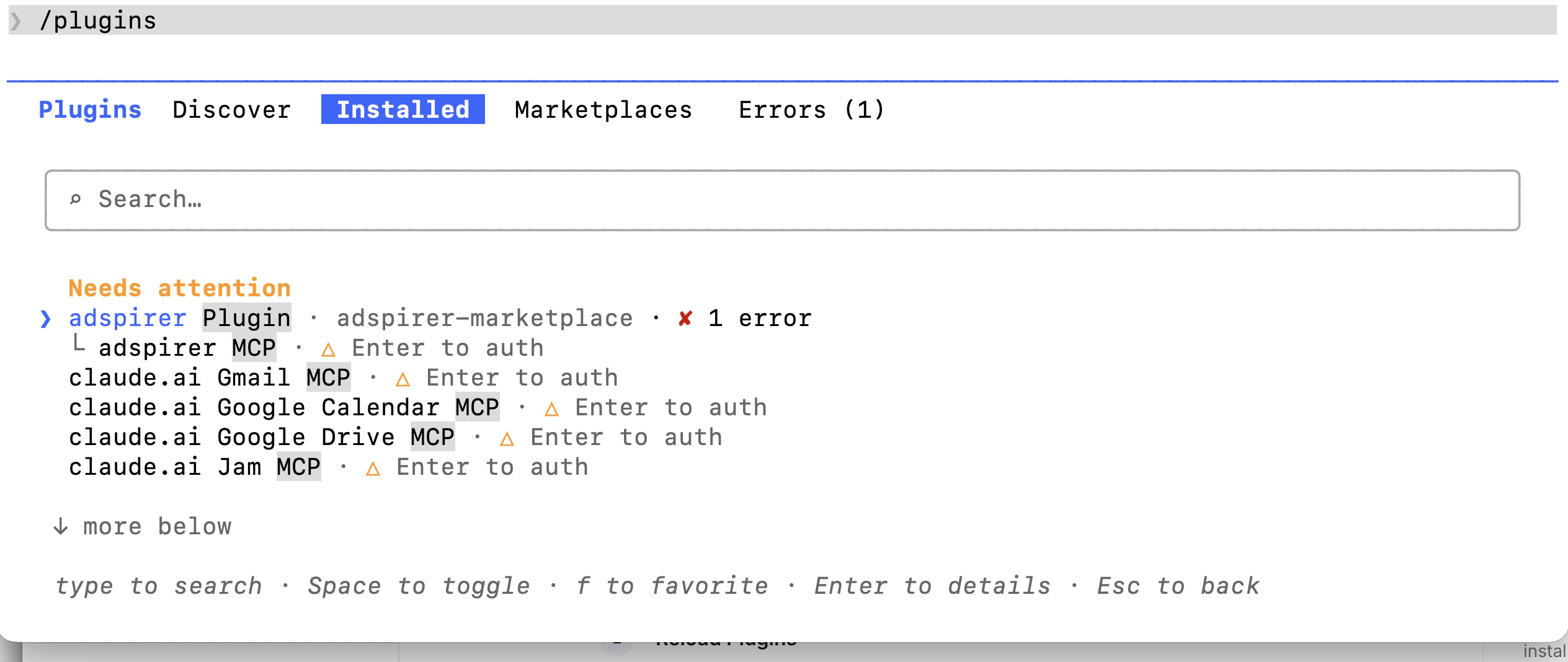
Or type `/plugin` to open the plugin manager. The UI has four tabs — **Discover**, **Installed**, **Marketplaces**, **Errors** — cycle with Tab.
In the **Discover** tab, search for `adspirer` (or `ads`). You'll see **adspirer-ads-agent** from `claude-community` — Anthropic's community marketplace, enabled by default.
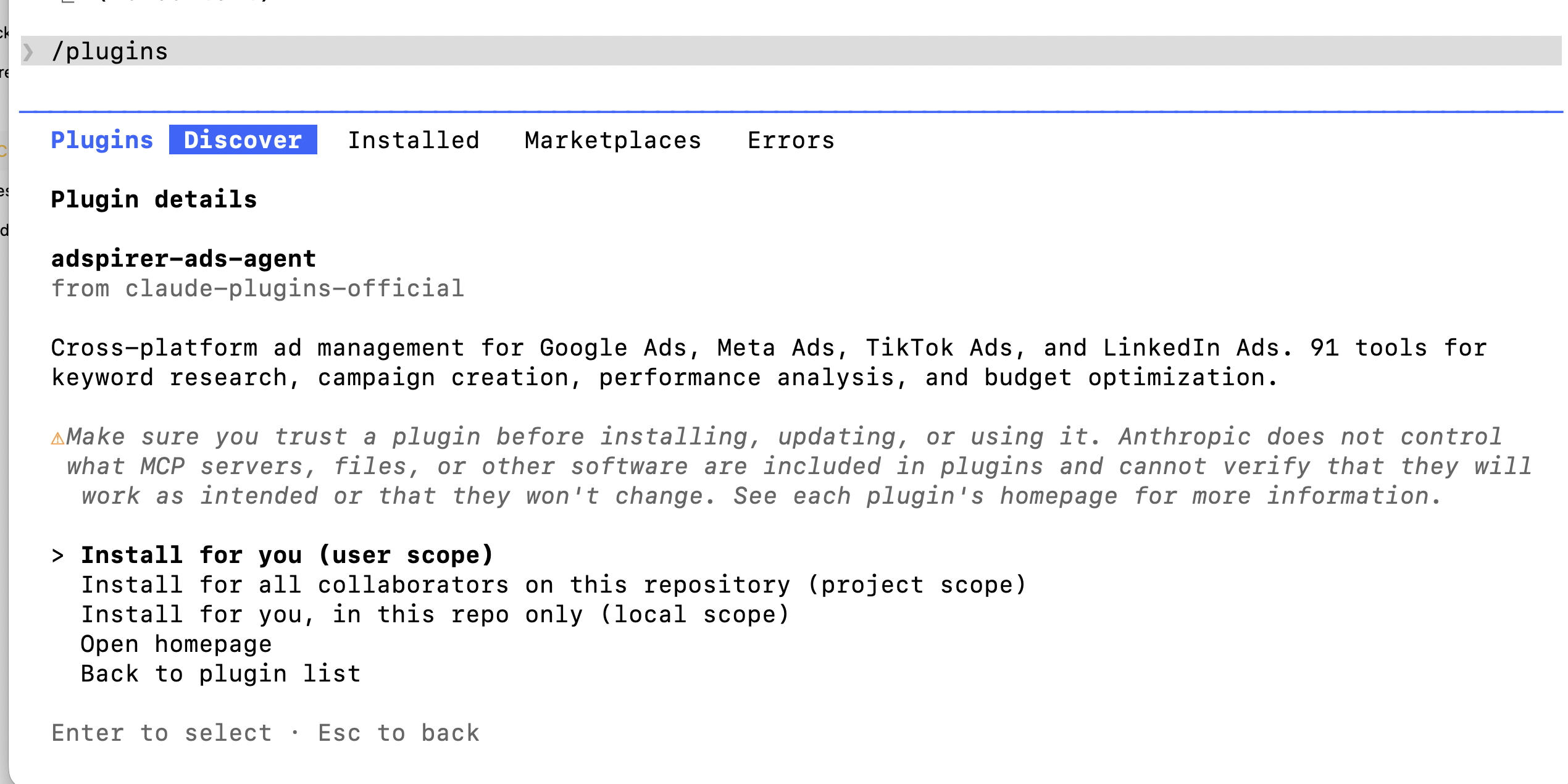
Press Enter on the plugin, then choose an install scope:
* **Install for you (user scope)** — recommended, available across all your projects
* **Install for all collaborators on this repository (project scope)**
* **Install for you, in this repo only (local scope)**
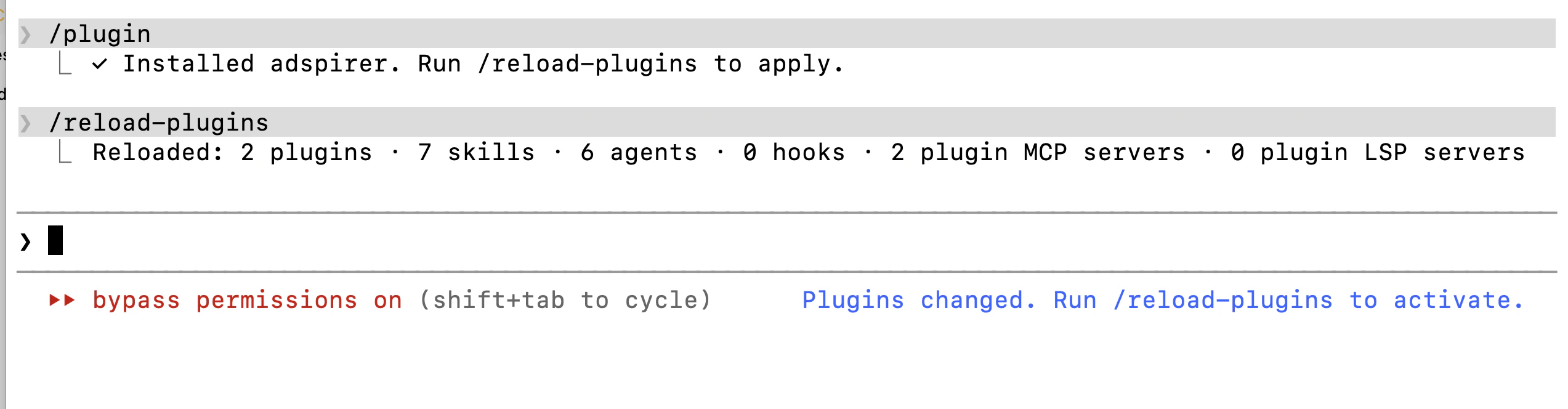
After installation, reload plugins to activate:
```bash theme={"theme":{"light":"github-light","dark":"github-dark"}}
/reload-plugins
```
Or close and reopen Claude Code.
The plugin's MCP server needs a one-time OAuth sign-in. Use either path:
**From the plugin manager (recommended):** type `/plugin`, open the **Installed** tab, and select **adspirer**. You'll see it flagged as "needs attention".
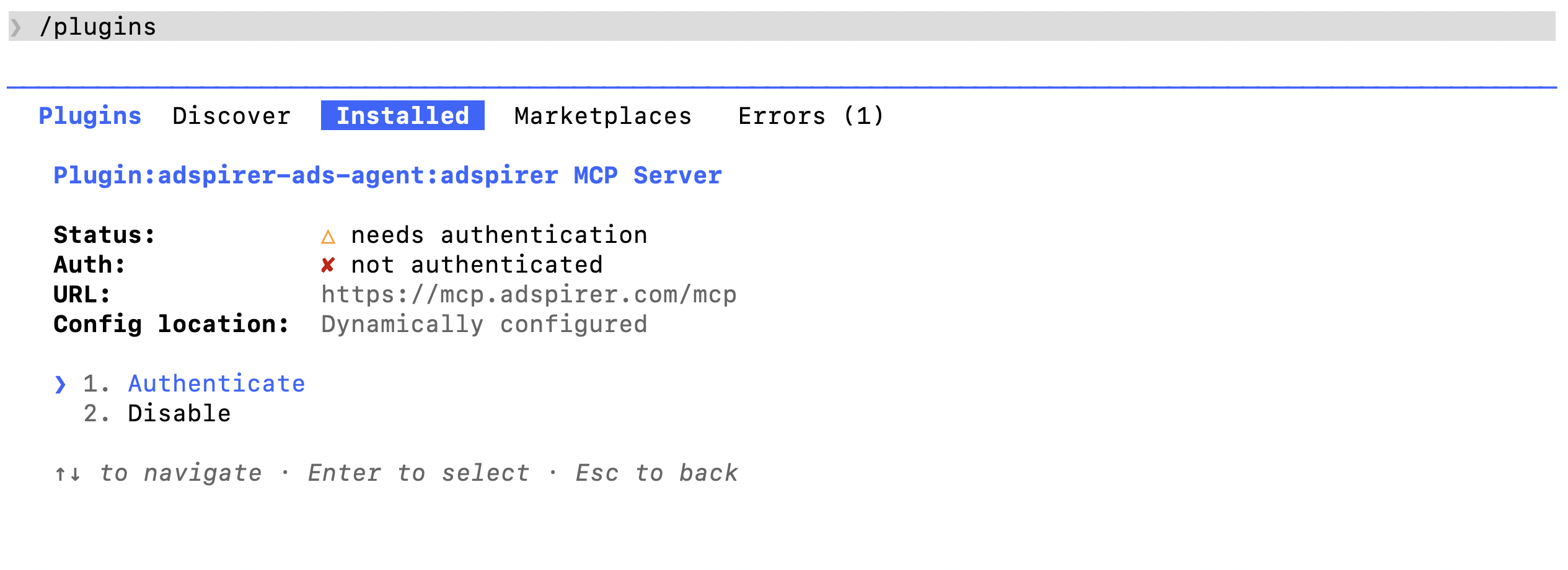
Select the plugin to open its detail view — you'll see **Plugin:adspirer-ads-agent:adspirer MCP Server** with status "needs authentication". Choose **Authenticate** — your browser opens for OAuth sign-in.
**From `/mcp`:** type `/mcp`, find **plugin:adspirer-ads-agent:adspirer MCP Server** in the list, select it, then choose **Authenticate**.
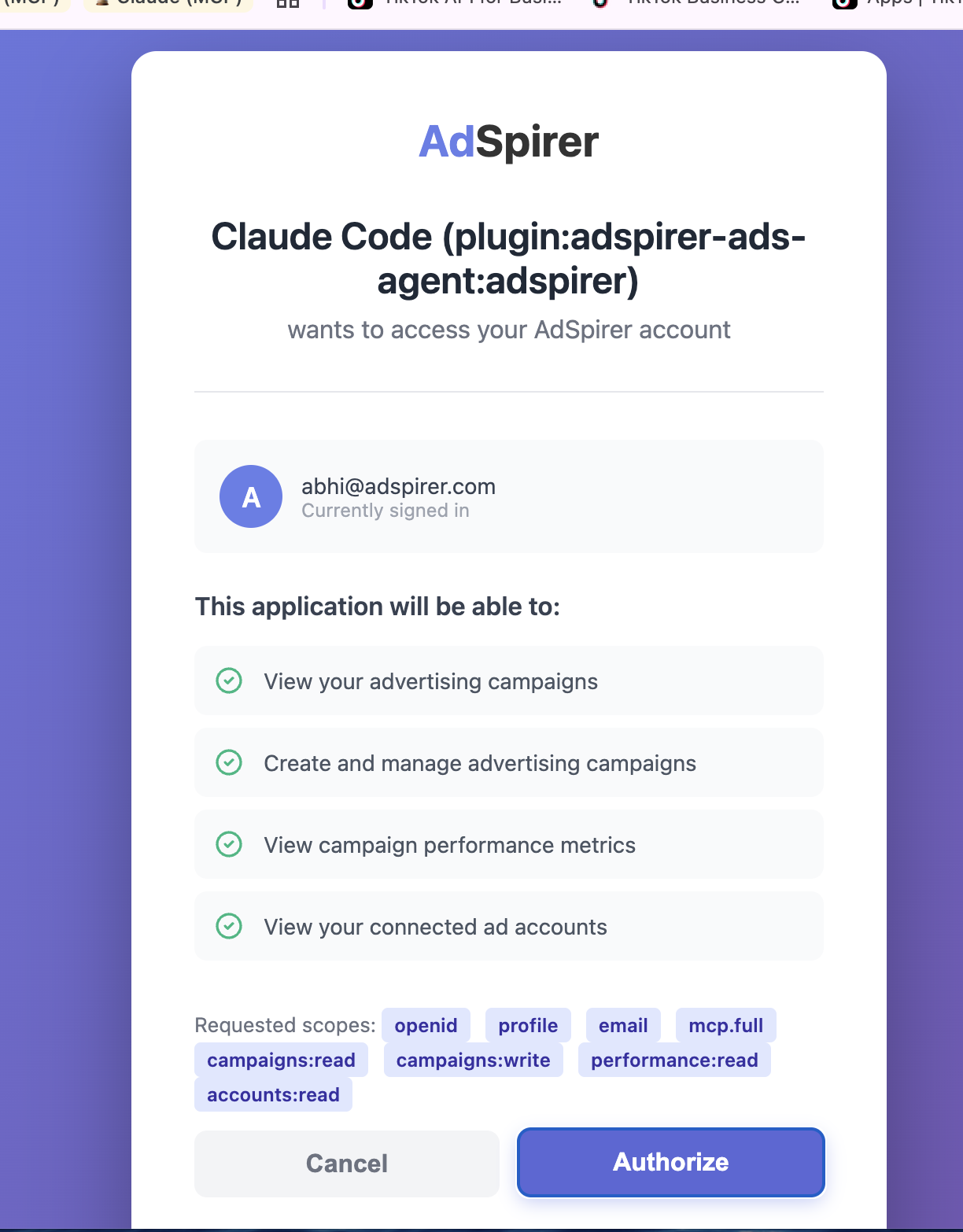
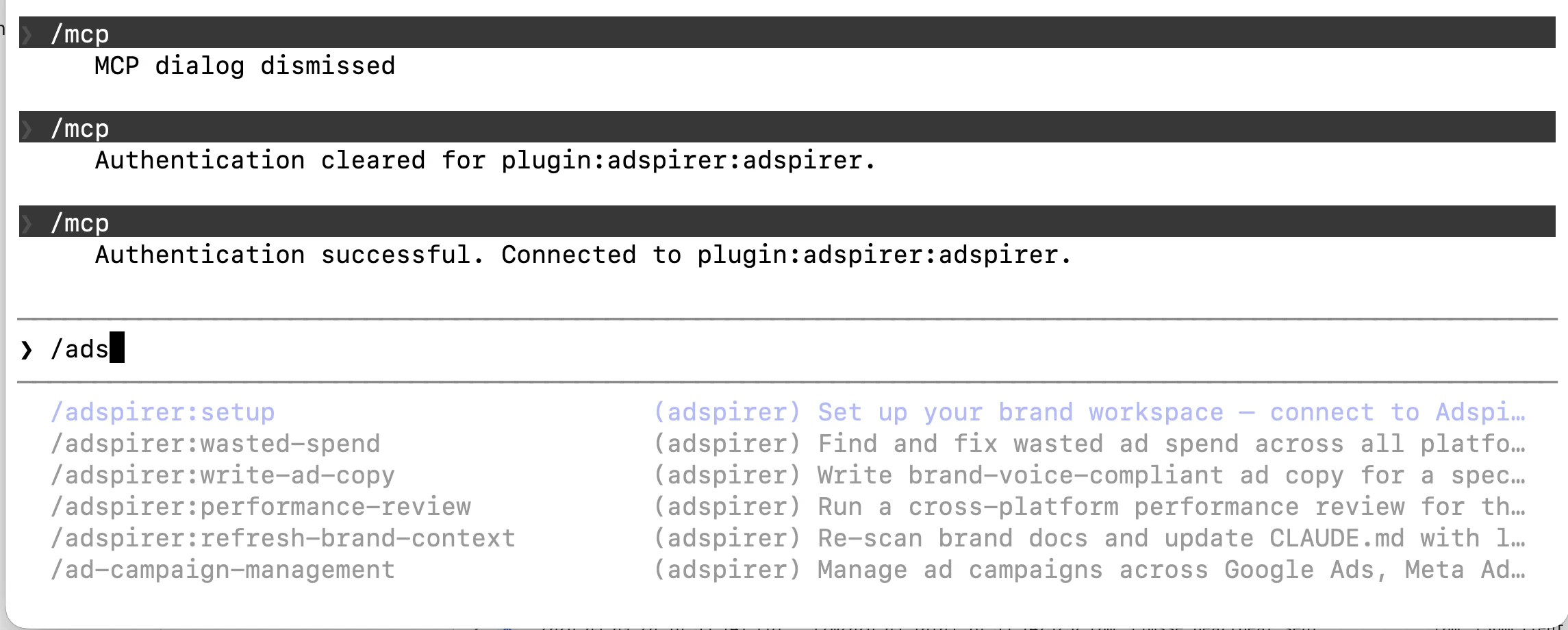
Sign in with your Adspirer account and authorize the requested scopes (campaigns:read/write, reporting:read, accounts:read). **New to Adspirer?** The browser lands on a quick sign-up page first — create a free account (no credit card) and you're sent straight back to the authorization screen. Return to Claude Code — you'll see "Authentication successful".
```bash theme={"theme":{"light":"github-light","dark":"github-dark"}}
/adspirer:setup
```
This connects to your accounts, scans your folder for brand docs, pulls live campaign data, and creates a `CLAUDE.md` brand workspace file.
15 free tool calls/month. No credit card required. Connect your ad accounts in 2 minutes.
### Verify Your Setup
Run a test prompt:
```
Check my connected ad platforms
```
You should see a table showing your connected accounts across Google Ads, Meta Ads, Amazon Ads, ChatGPT Ads, LinkedIn Ads, and TikTok Ads — along with account IDs, names, and connection status.
You're connected. Claude Code now has access to 400+ advertising tools from your terminal.
## Brand Workspace
When you run `/adspirer:setup`, the agent bootstraps a brand-specific workspace:
1. **Connects to Adspirer** — verifies your ad platform connections
2. **Scans your folder** — reads any brand docs (`.md`, `.txt`, `.csv`, `.yaml`, `.json`, `.pdf`) for voice, audience, and budget context
3. **Pulls live data** — campaign performance, search terms, benchmarks from all connected platforms
4. **Creates `CLAUDE.md`** — a brand context file with connected platforms, performance snapshot, KPI targets, and brand guidelines
Open your brand folder and run setup:
```bash theme={"theme":{"light":"github-light","dark":"github-dark"}}
cd ~/Clients/YourBrand
claude
```
Then say "set up my brand workspace" or run `/adspirer:setup`.
Your brand folder can contain docs or be completely empty — the agent builds context from your live ad platform data either way. More docs = better brand context = better ad copy and recommendations.
## Slash Commands
The plugin includes 5 slash commands that trigger proven workflows:
| Command | What it Does |
| --------------------------------- | -------------------------------------------------------------------------------------- |
| `/adspirer:setup` | Bootstrap a brand workspace — connect accounts, scan docs, pull data, create CLAUDE.md |
| `/adspirer:performance-review` | Cross-platform performance scorecard with KPI comparison |
| `/adspirer:write-ad-copy` | Brand-voice ad copy from real keyword and performance data |
| `/adspirer:wasted-spend` | Find and fix wasted spend across all platforms |
| `/adspirer:refresh-brand-context` | Re-scan docs and update CLAUDE.md with latest data |
You don't need to remember these — just describe what you want and Claude will use the right workflow.
## What You Can Do
400+ tools across 6 ad platforms. Here's what matters:
| Platform | Tools | Key Capabilities |
| ---------------- | ----- | ----------------------------------------------------------------------------------------------------------------------------------------- |
| **Google Ads** | 147 | Keyword research with real CPC data, Search & PMax campaigns, wasted spend analysis, budget optimization, ad extensions, asset management |
| **Amazon Ads** | 61 | Sponsored Products, Brands & Display, ASIN/keyword targeting, ACOS & ROAS analytics, budget recommendations |
| **LinkedIn Ads** | 55 | Sponsored content, lead gen forms, B2B targeting (job titles, industries, seniority), creative performance analysis |
| **Meta Ads** | 54 | Image/video/carousel campaigns, audience targeting, creative fatigue detection, placement optimization |
| **TikTok Ads** | 37 | In-feed campaigns, asset validation, performance analysis |
| **ChatGPT Ads** | 31 | Pay-per-click chat-card ads inside ChatGPT responses, launch orchestrator, conversions (pixel + CAPI); created paused |
Plus 8 automation tools: scheduled briefs, performance monitors, cross-platform reports.
## Example Prompts
What to actually say once you're set up:
### Google Search Campaign
Create a Google Ads search campaign for my SaaS product:
* Product: project management tool for remote teams
* Target: team leads and ops managers at companies with 20-200 employees
* Budget: \$60/day
* Research keywords with real CPC data first
* Group keywords by intent (branded, competitor, feature-based)
### Google PMax Campaign
Set up a Performance Max campaign for my e-commerce store:
* Product: organic dog treats, \$24.99 avg order value
* Target ROAS: 400%
* I have product images at these URLs: \[paste URLs]
* Write 5 headlines and 3 descriptions
* Use my existing Google Merchant Center feed
### Meta Ads Campaign
Create a Meta image campaign for my skincare brand:
* Product: anti-aging serum for women 30-55
* Budget: \$40/day
* Target interests: skincare, beauty, wellness, anti-aging
* Image URL: \[paste URL]
* Write 3 primary text variations and 2 headlines
* Optimize for purchases
### LinkedIn Ads Campaign
Launch a LinkedIn sponsored content campaign:
* Product: enterprise data analytics platform
* Target: VPs and Directors of Data/Analytics at companies with 500+ employees
* Industries: financial services, healthcare, technology
* Budget: \$100/day
* Goal: lead generation with a whitepaper download
* Image URL: \[paste URL]
### Cross-Platform Audit
Audit all my ad accounts for the last 30 days:
* Google: find wasted spend (keywords with clicks but zero conversions)
* Meta: check for creative fatigue (frequency > 3, declining CTR)
* LinkedIn: compare CPA across audience segments
Give me a prioritized action list with estimated monthly savings.
## Safety Features
Adspirer's agent skills enforce safety rules to prevent accidental spend:
* **All campaigns created PAUSED:** You review before they go live
* **User confirmation required:** Claude asks before any action that affects spend
* **Read-before-write:** Skills force research and validation before campaign creation
* **Connection status checks:** Always verifies you're managing the right account first
* **No automatic retries:** If a campaign creation fails, Claude won't retry without asking
## Troubleshooting
### "Nested session" error when installing
If you see `Error: Claude Code cannot be launched inside another Claude Code session`, you're asking the AI to install the plugin instead of typing the slash command yourself. The `/plugin` command must be typed directly into the Claude Code input — don't ask Claude to run them for you.
### Plugin not showing after install
Run `/reload-plugins` after installing, or restart Claude Code. Then verify via either:
* `/plugin` → **Installed** tab — you should see **adspirer** listed
* `/mcp` — you should see **plugin:adspirer-ads-agent:adspirer MCP Server**
If the plugin is missing from the **Discover** tab, refresh the marketplace: `/plugin marketplace update claude-community`.
### Authentication keeps failing
Clear your browser cache or try a different browser. The OAuth flow uses PKCE for security — some browser extensions can interfere. Disable ad blockers temporarily.
### MCP server not found
Run `/mcp` and look for **plugin:adspirer-ads-agent:adspirer MCP Server**. If it's missing, run `/reload-plugins` or restart Claude Code. If it's still missing, re-run `/plugin install adspirer-ads-agent@claude-community`.
### Tools not working after connecting
Check your Adspirer account status at [adspirer.ai](https://adspirer.ai?utm_source=docs\&utm_medium=page\&utm_content=account). Free accounts get 15 tool calls/month. If you've hit the limit, upgrade to Plus ($49/mo for 150 calls) or Pro ($99/mo for 600 calls).
### Skills not loading
Verify the skills directory exists:
```bash theme={"theme":{"light":"github-light","dark":"github-dark"}}
ls -la ~/.claude/skills/ad-campaign-management/
```
You should see a SKILL.md file. If not, re-run the plugin install command.
### Slash commands not available
If `/adspirer:setup` isn't recognized, the plugin may not be installed. Run:
```bash theme={"theme":{"light":"github-light","dark":"github-dark"}}
/plugin install adspirer-ads-agent@claude-community
/reload-plugins
```
## FAQ
No. MCP (Model Context Protocol) is the plumbing — you don't interact with it directly. You just talk to Claude in plain English. The MCP connection happens behind the scenes.
**Claude Code is Anthropic's terminal/CLI developer tool** — you run `claude` in a shell, it works inside your codebase, optimized for software-engineering workflows. There's also a Claude Code desktop / IDE-side surface.
**[Claude Cowork](/ai-clients/claude-cowork)** is a completely different product — a brand-aware workspace mode inside the Claude desktop app (and on claude.ai). You open a folder, Claude reads its docs, and you collaborate with it on the work in that folder.
Both support Adspirer through MCP, but they're separate apps. Use Claude Code if you live in the terminal. Use [Claude Cowork](/ai-clients/claude-cowork) if you want a brand-aware workspace with folder context.
The `adspirer-ads-agent` plugin installs: the MCP server connection, 5 slash commands (setup, performance-review, write-ad-copy, wasted-spend, refresh-brand-context), a performance marketing agent, and the ad campaign management skill file.
Yes. Adspirer supports multiple accounts per platform. Use the `switch_primary_account` tool to change which account you're managing, or specify the account ID in your prompts.
Adspirer pricing is based on tool calls, not ad spend. Free tier: 15 calls/month. Plus: $49/mo for 150 calls. Pro: $99/mo for 600 calls. Max: \$199/mo for 3,000 calls. See the [full pricing breakdown](https://www.adspirer.com/pricing).
Yes. Adspirer uses OAuth 2.1 with PKCE — we never see your passwords. Your ad account credentials live with Google/Meta/LinkedIn/TikTok. We only get read/write permissions you explicitly authorize. You can revoke access anytime from your ad platform's security settings.
## Related Documentation
* [Google Ads Integration Guide](/ad-platforms/google-ads)
* [Claude Desktop + Adspirer](https://www.adspirer.com/integrations/claude)
* [Pricing & Plans](https://www.adspirer.com/pricing)
* [All Documentation](/introduction)
 Press Enter on the plugin, then choose an install scope:
* **Install for you (user scope)** — recommended, available across all your projects
* **Install for all collaborators on this repository (project scope)**
* **Install for you, in this repo only (local scope)**
Press Enter on the plugin, then choose an install scope:
* **Install for you (user scope)** — recommended, available across all your projects
* **Install for all collaborators on this repository (project scope)**
* **Install for you, in this repo only (local scope)**
 Select the plugin to open its detail view — you'll see **Plugin:adspirer-ads-agent:adspirer MCP Server** with status "needs authentication". Choose **Authenticate** — your browser opens for OAuth sign-in.
 **From `/mcp`:** type `/mcp`, find **plugin:adspirer-ads-agent:adspirer MCP Server** in the list, select it, then choose **Authenticate**.
Sign in with your Adspirer account and authorize the requested scopes (campaigns:read/write, reporting:read, accounts:read). **New to Adspirer?** The browser lands on a quick sign-up page first — create a free account (no credit card) and you're sent straight back to the authorization screen. Return to Claude Code — you'll see "Authentication successful".
**From `/mcp`:** type `/mcp`, find **plugin:adspirer-ads-agent:adspirer MCP Server** in the list, select it, then choose **Authenticate**.
Sign in with your Adspirer account and authorize the requested scopes (campaigns:read/write, reporting:read, accounts:read). **New to Adspirer?** The browser lands on a quick sign-up page first — create a free account (no credit card) and you're sent straight back to the authorization screen. Return to Claude Code — you'll see "Authentication successful".