> ## Documentation Index
> Fetch the complete documentation index at: https://www.adspirer.com/docs/llms.txt
> Use this file to discover all available pages before exploring further.
# Connect Claude Cowork to Ad Platforms | Adspirer
> Connect Claude Cowork (Claude's desktop app workspace mode — not the terminal CLI) to Adspirer. Manage Google, Meta, Amazon, ChatGPT, LinkedIn, and TikTok Ads with 400+ tools, brand-aware skills, and a marketing agent.
**Claude Cowork is Claude's brand-aware workspace mode inside the Claude desktop app** (and on claude.ai) — you open a folder, Claude reads its docs, and you collaborate with it on the work in that folder. This is different from [Claude Code](/docs/ai-clients/claude-code), which is Anthropic's terminal/CLI developer tool. They're two separate products from Anthropic that both happen to support MCP connectors.
**Cowork vs. Claude Code — which page do you want?**
| | **Claude Cowork** (this page) | **[Claude Code](/docs/ai-clients/claude-code)** |
| ---------------------------- | --------------------------------------------------------------------------------------------- | ------------------------------------------------------ |
| **What it is** | Workspace mode in the Claude desktop app — open a folder, chat with Claude about its contents | Terminal CLI / IDE-side developer tool from Anthropic |
| **Where you use it** | Claude desktop app → **Cowork** tab (or claude.ai → Cowork) | `claude` command in your shell, or Claude Code desktop |
| **How you connect Adspirer** | Browse Plugins → Install Adspirer in **Customize** (this page) | `/plugin install adspirer-ads-agent@claude-community` |
| **Plan required** | Claude **Max**, Team, or Enterprise | Any Claude plan |
| **Best for** | Brand-aware advertising work where Claude reads your brand folder | Terminal-first developer workflows |
This page is for **Claude Cowork** — Claude's brand-aware advertising workspace. Connect Adspirer and you get 400+ ad management tools the agent can call against your Google, Meta, Amazon, ChatGPT Ads, LinkedIn, and TikTok accounts, all grounded in the brand folder you point Cowork at.
## Prerequisites
* A Claude **Max**, **Team**, or **Enterprise** subscription (Cowork requires Max or above)
* An Adspirer account ([free to start](https://adspirer.ai/sign-up?utm_source=docs\&utm_medium=page\&utm_content=signup))
* At least one ad platform account: Google Ads, Meta Ads, LinkedIn Ads, or TikTok Ads
## Setup (5 Minutes)
The recommended path is **Browse Plugins → Install Adspirer**. This installs the connector along with 5 slash commands, two skills, and a Performance Marketing Agent in one step.
### 1. Open Cowork and Customize
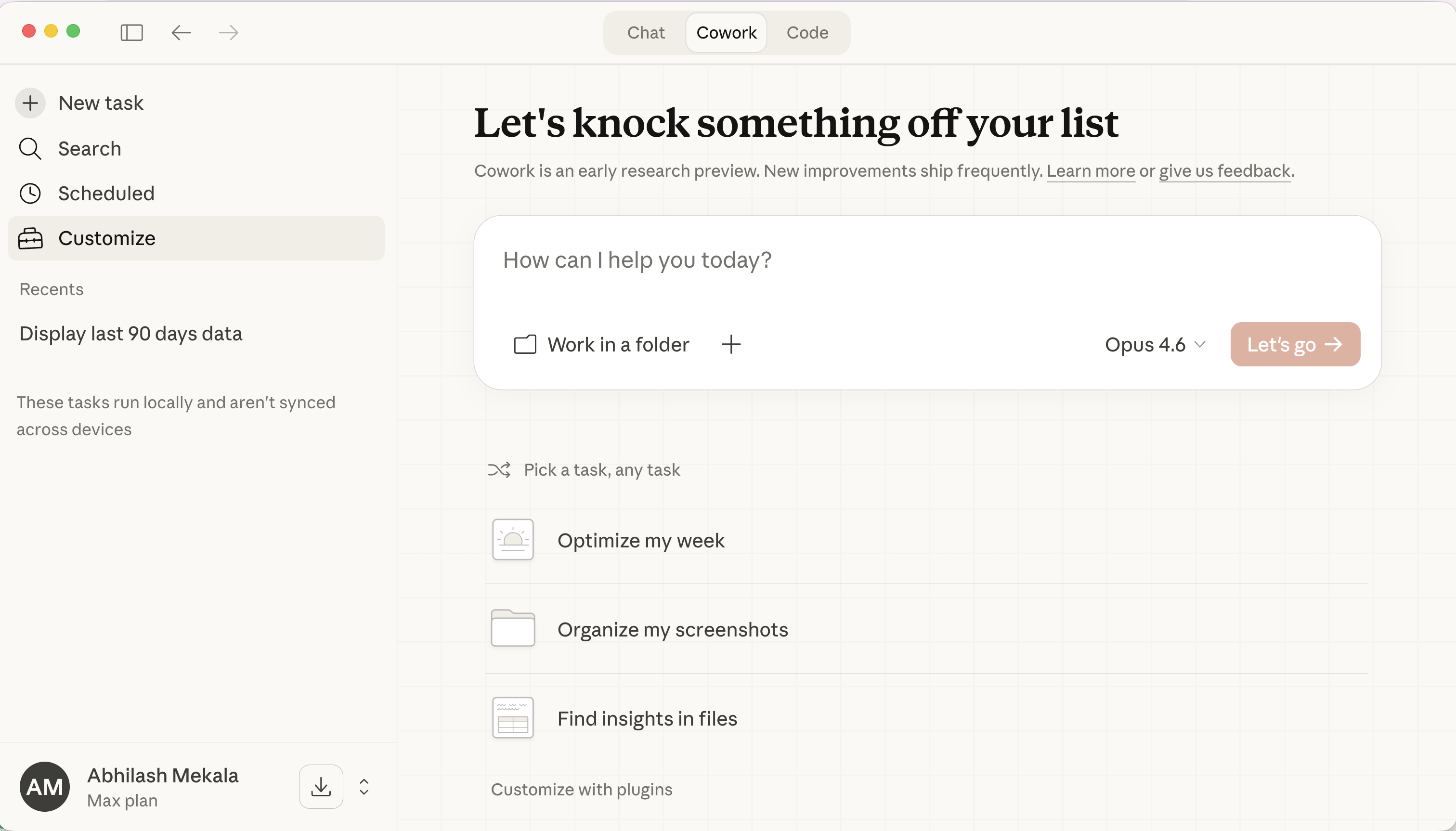
Open the Claude desktop app (or claude.ai) and click the **Cowork** tab at the top.
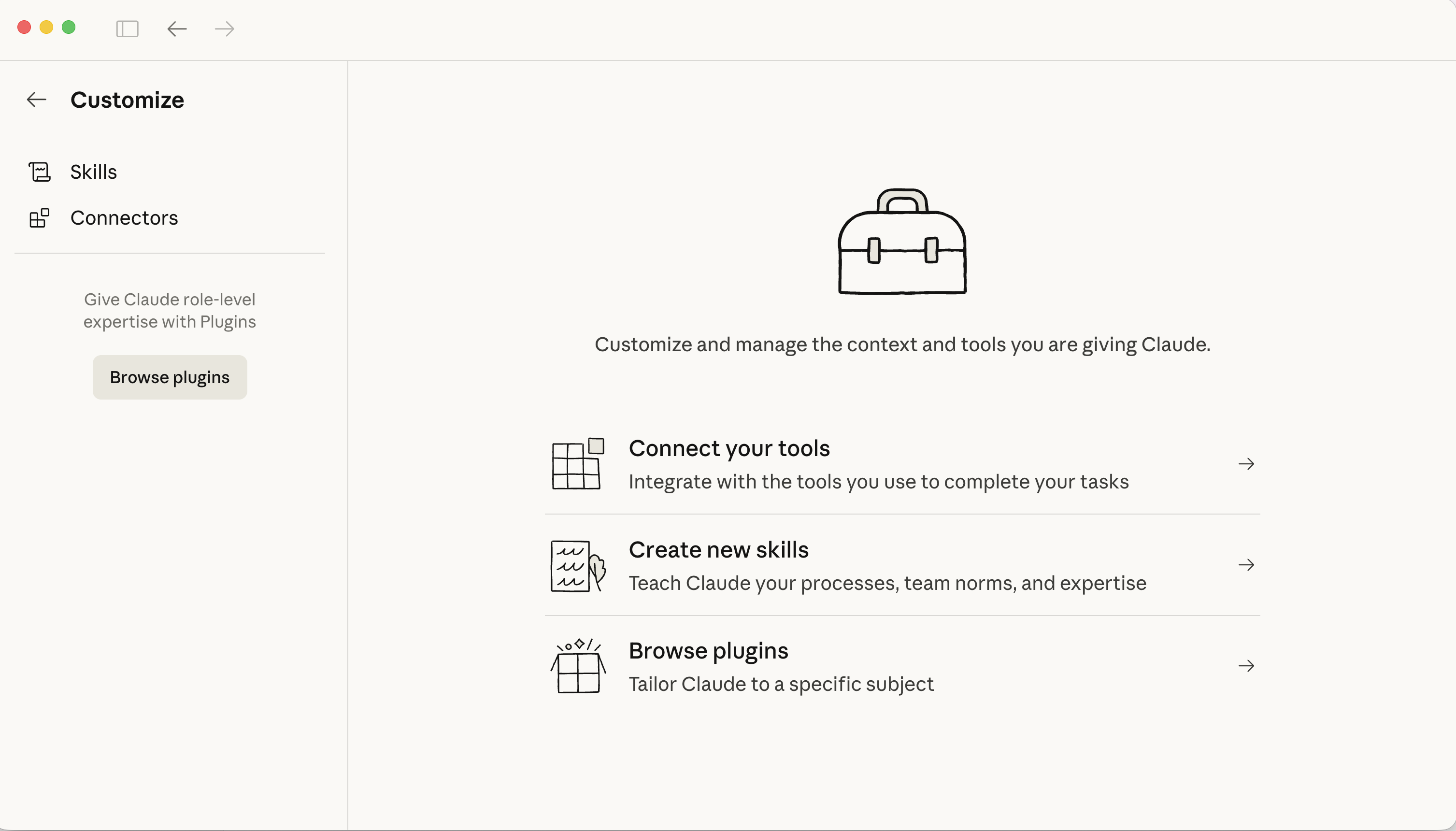
Click **Customize** in the left sidebar. You'll see options for Skills, Connectors, and Browse Plugins.
### 2. Browse Plugins and install Adspirer
The plugin bundles the Adspirer connector with 5 slash commands, two skills, and a Performance Marketing Agent — the full agent experience in one install.
Click **Browse plugins** and search for **adspirer**. You'll see the **adspirer-ads-agent** plugin in the official marketplace. Click on it to install.
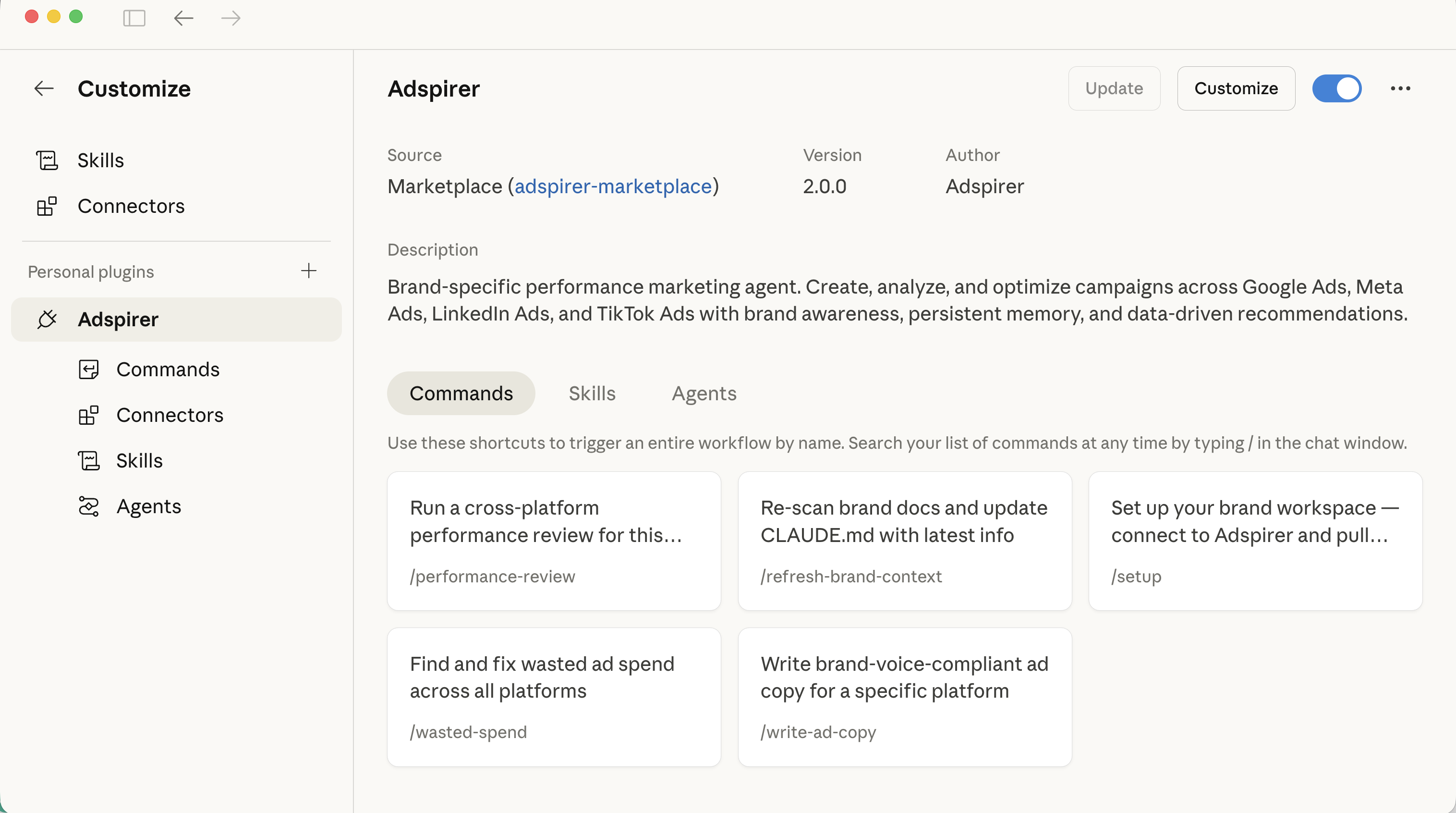
Once installed, you'll see everything included in the Adspirer plugin:
**Commands** — Slash commands that trigger proven advertising workflows:
* `/performance-review` — Run a cross-platform performance review
* `/refresh-brand-context` — Re-scan brand docs and update CLAUDE.md
* `/setup` — Set up your brand workspace
* `/wasted-spend` — Find and fix wasted ad spend across all platforms
* `/write-ad-copy` — Write brand-voice-compliant ad copy
**Skills** — Two skills that teach Claude advertising best practices
**Agents** — A Performance Marketing Agent that specializes in using Adspirer's 400+ tools
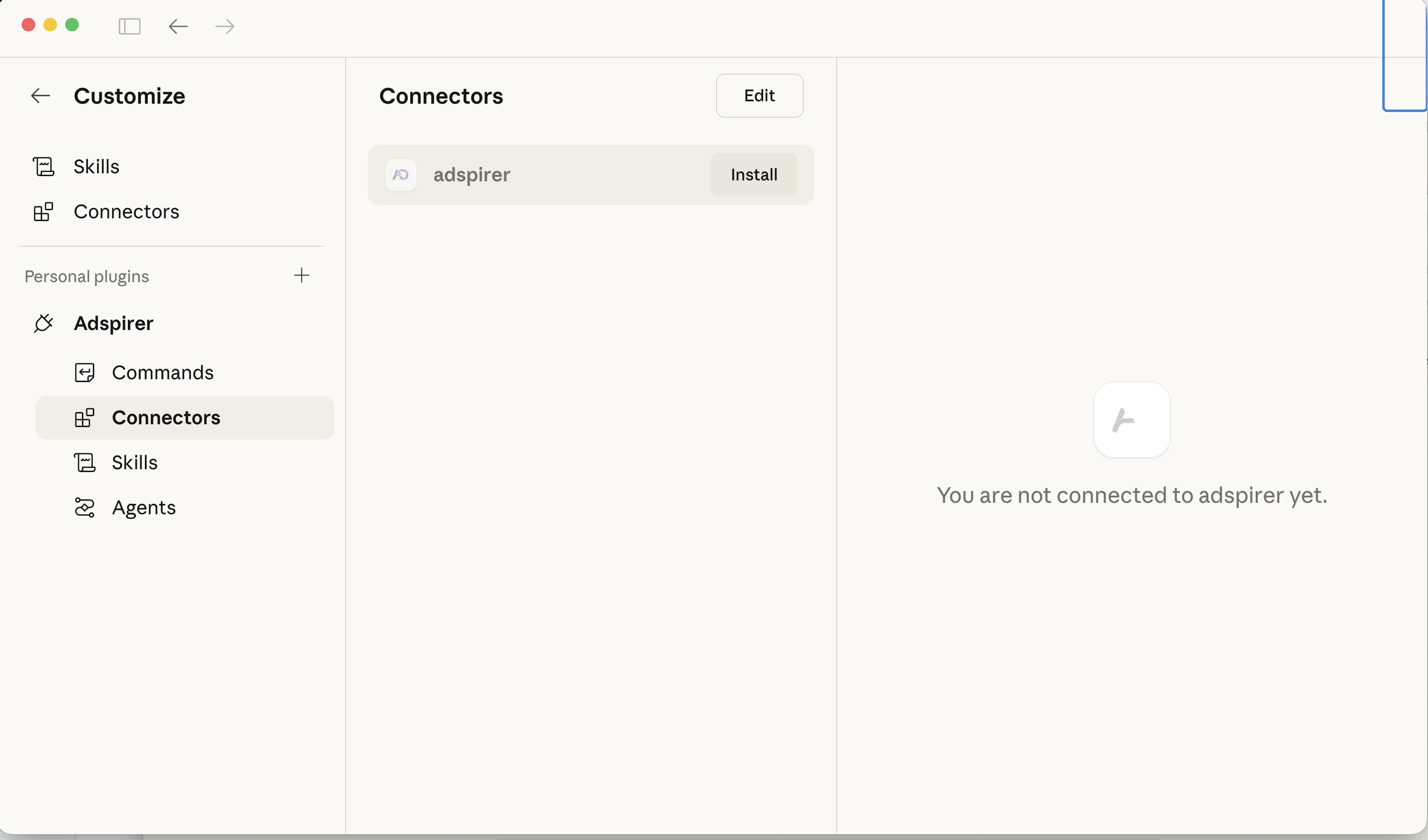
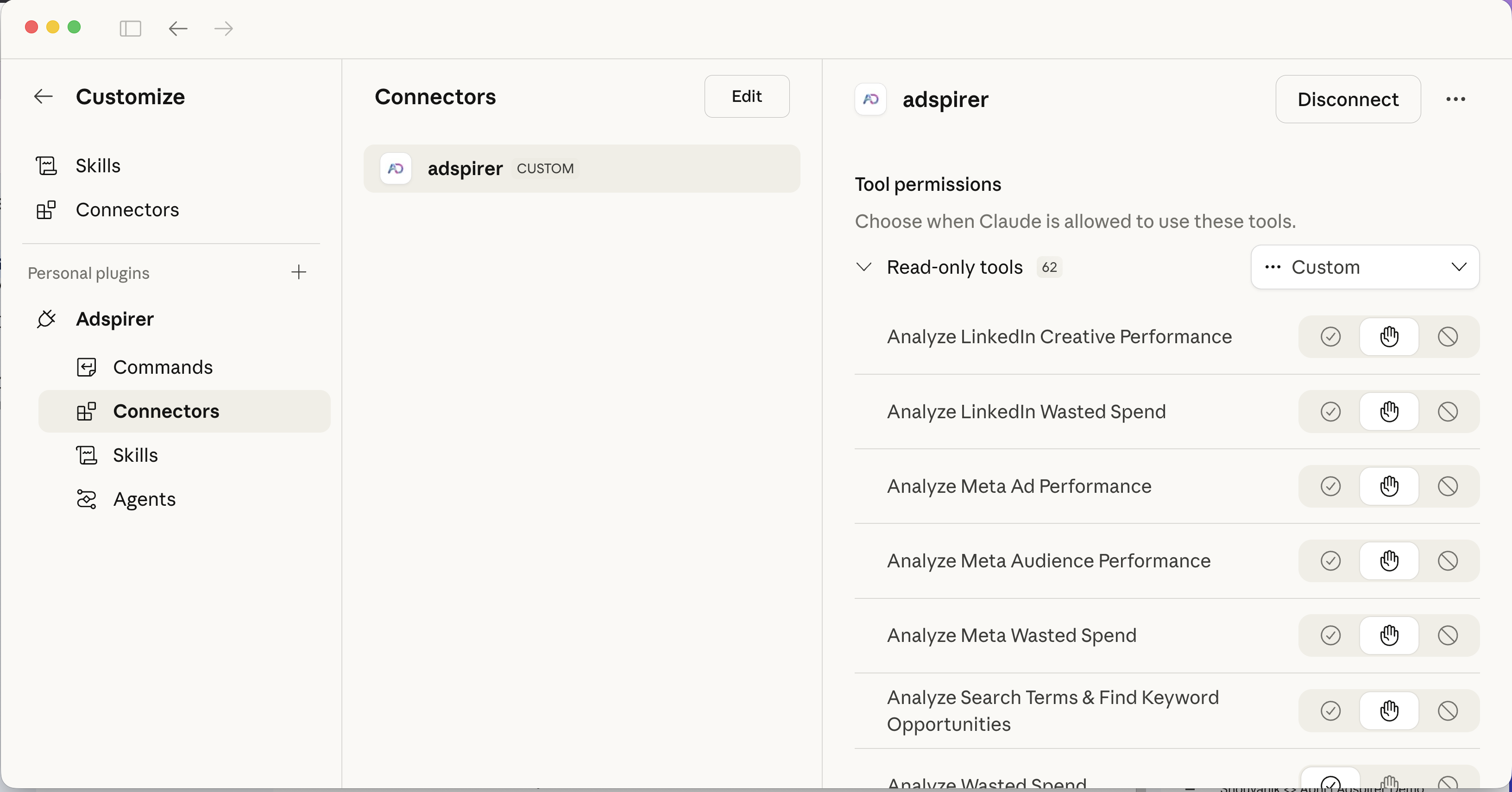
In the left sidebar under the Adspirer plugin, click **Connectors**. You'll see the **adspirer** connector. Click **Install**.
**Install button grayed out?** Two common causes:
* **You're on a VPN** — Many corporate VPNs block the connector handshake to `mcp.adspirer.com`. Disconnect from the VPN and try again.
* **IT hasn't enabled external connectors** — On Claude Team/Enterprise, external MCP connectors are off by default and won't appear on the intranet until your workspace admin enables them. Ask your IT or workspace admin to allow external connectors for Adspirer.
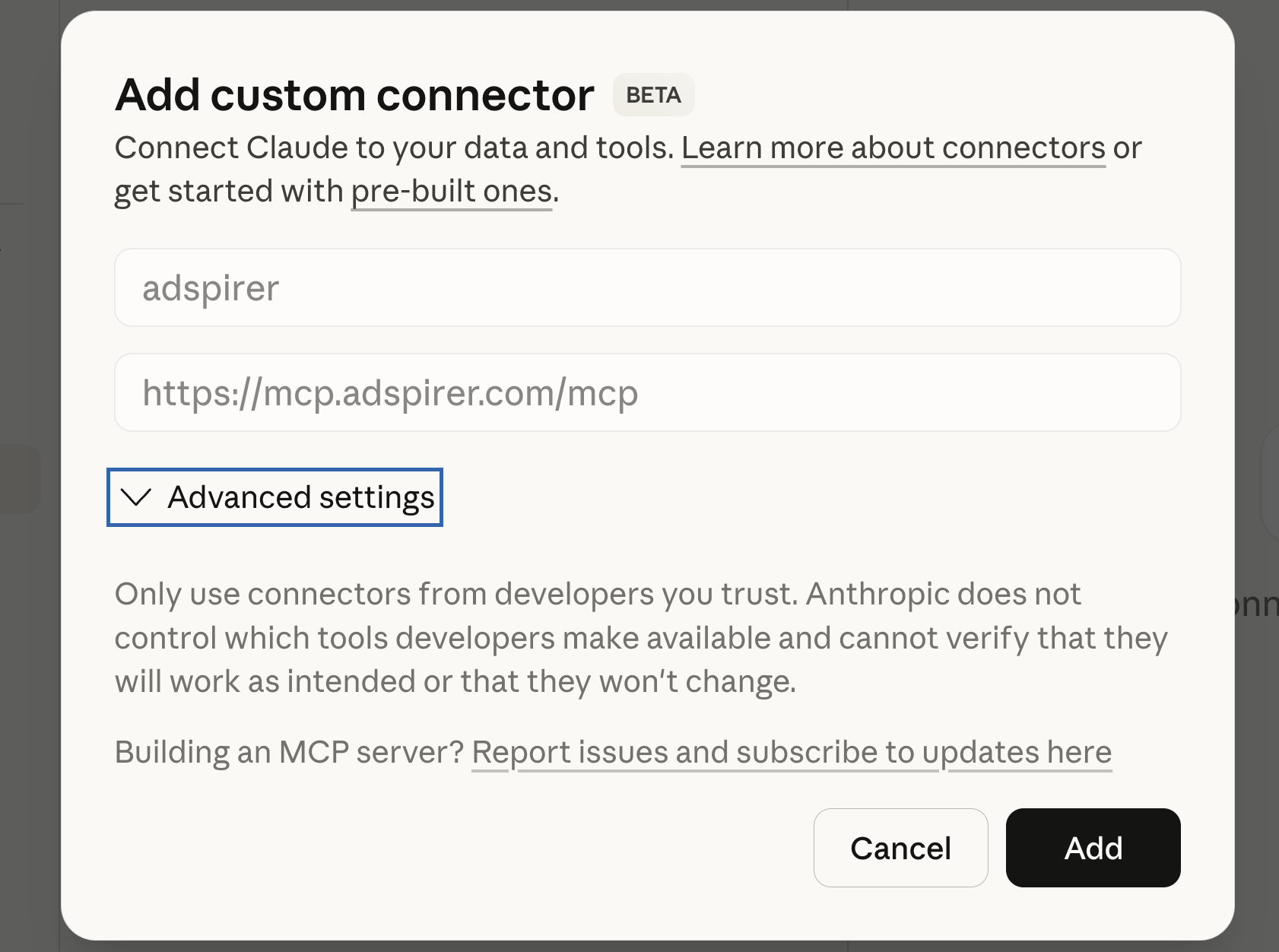
A popup appears with the connector pre-filled (name: `adspirer`, URL: `https://mcp.adspirer.com/mcp`). Click **Add**.
Your browser opens and redirects to Adspirer's OAuth page. Sign in (or create an account) and link your Google Ads, Meta Ads, Amazon Ads, ChatGPT Ads, LinkedIn Ads, and/or TikTok accounts.
Once authorized, the connector status flips to **connected** with all 400+ tools listed under tool permissions.
**Recommended tool permissions.** Set **Interactive** and **Read-only** tools to **Always allow** so research, reporting, and dashboards run without interruption. Leave **Write / delete** tools on **Needs approval**, so anything that changes a campaign still pauses for your confirmation — and remember Adspirer also creates every new campaign paused by default.
If the connector doesn't show as connected right away, restart Claude and check again.
### 3. Open a brand folder and try it
Back on the Cowork main screen, click **Work in a folder** and select the folder containing your brand documents — voice of customer research, brand guidelines, previous campaigns, keyword research, audience targeting docs, or any other brand context.
Claude Cowork will use this folder as your brand workspace. The more context you provide, the better Adspirer's recommendations and ad copy will be.
Your brand folder can contain docs or be completely empty — the agent builds context from your live ad platform data either way. More docs = better brand context = better ad copy and recommendations.
15 free tool calls/month. No credit card required. Connect your ad accounts in 2 minutes.
You're connected. Claude Cowork now has access to 400+ advertising tools, brand-aware skills, and a Performance Marketing Agent that knows how to use them in the right order.
## Slash Commands
The plugin includes 5 slash commands that trigger proven workflows:
| Command | What it Does |
| ------------------------ | -------------------------------------------------------------------------------------- |
| `/setup` | Bootstrap a brand workspace — connect accounts, scan docs, pull data, create CLAUDE.md |
| `/performance-review` | Cross-platform performance scorecard with KPI comparison |
| `/write-ad-copy` | Brand-voice ad copy from real keyword and performance data |
| `/wasted-spend` | Find and fix wasted spend across all platforms |
| `/refresh-brand-context` | Re-scan docs and update CLAUDE.md with latest data |
You don't need to remember these — just describe what you want and Claude will use the right workflow.
## What You Can Do
400+ tools across 6 ad platforms:
| Platform | Tools | Key Capabilities |
| ---------------- | ----- | ---------------------------------------------------------------------------------------------------------------------------- |
| **Google Ads** | 147 | Keyword research with real CPC data, Search & PMax campaigns, per-ad performance, wasted spend analysis, budget optimization |
| **Meta Ads** | 54 | Image/video/carousel campaigns, audience targeting, creative fatigue detection, EU DSA support |
| **Amazon Ads** | 61 | Sponsored Products / Brands / Display, ASIN targeting, ACOS/ROAS analytics, wasted-spend detection |
| **ChatGPT Ads** | 31 | Launch & manage pay-per-click chat-card ads inside ChatGPT, paused by default |
| **LinkedIn Ads** | 55 | Sponsored content, lead gen forms, B2B targeting by job title, industry, seniority |
| **TikTok Ads** | 37 | In-feed video, Spark Ads, Carousel, asset validation, performance analysis |
## Example Prompts
### Research Keywords
Research Google Ads keywords for "project management software" —
show search volume, CPC, and competition level
### Create a Campaign
Create a Google Ads search campaign for my SaaS product:
* Product: project management tool for remote teams
* Budget: \$60/day
* Research keywords first, then group by intent
### Cross-Platform Audit
Audit all my ad accounts for the last 30 days:
* Google: find wasted spend (keywords with clicks but zero conversions)
* Meta: check for creative fatigue (frequency > 3, declining CTR)
* LinkedIn: compare CPA across audience segments
Give me a prioritized action list with estimated monthly savings.
## Why Claude Cowork for Advertising
* **Brand-Aware** — Cowork reads the brand folder you point it at. Voice guidelines, past campaigns, audience targeting docs — all of it informs ad copy and recommendations.
* **Desktop App, Not Terminal** — Cowork lives in the Claude desktop app and on claude.ai. No CLI, no terminal commands. If you want a CLI workflow, use [Claude Code](/docs/ai-clients/claude-code) instead.
* **Plugin Ecosystem** — The Adspirer plugin ships 5 slash commands, two skills, and a Performance Marketing Agent that knows how to use all 400+ Adspirer tools in the right order with safety rules — all installed in one click from Browse Plugins.
* **Progress Streaming** — Real-time updates during long operations. See campaign creation progress as it happens.
* **Native MCP** — Anthropic created the Model Context Protocol. Claude has the deepest, most reliable integration.
## FAQ
Claude Cowork is a **workspace mode inside the Claude desktop app** (also on claude.ai) where you point Claude at a folder on your machine and it reads everything inside as context — brand docs, voice guidelines, past campaigns, keyword research. You then chat with Claude about that work, and the agent has full visibility into your brand. Cowork is built around folders + plugins + connectors. It's where brand-aware advertising work happens.
**No — they are two different products from Anthropic.**
* **Claude Cowork** is the workspace mode inside the Claude desktop app and claude.ai. You use it through a GUI. It's the page you're on right now.
* **[Claude Code](/docs/ai-clients/claude-code)** is Anthropic's terminal/CLI developer tool. You run `claude` in a shell, it works inside your codebase, and it's optimized for software-engineering workflows. It also has a desktop / IDE-side surface.
They're separate apps. Cowork ≠ Claude Code. If you typed `claude` in your terminal to get here, you want the [Claude Code setup page](/docs/ai-clients/claude-code), not this one.
Claude Chat (the standard chat interface) supports connectors — you add an MCP server URL and that's it. Cowork supports the same connectors **plus** plugins (slash commands, skills, agents) **plus** brand folders. For one-off ad questions, Chat is fine. For ongoing brand-aware work, Cowork is the richer surface.
Cowork is available on Claude Max, Team, and Enterprise plans. Pro plans have access to Chat connectors but not the full Cowork experience.
The plugin installs: the MCP server connection, 5 slash commands (setup, performance-review, write-ad-copy, wasted-spend, refresh-brand-context), 2 advertising skills, and 1 performance marketing agent — all bundled into a single Browse Plugins → Install step.
Two common causes:
* **You're on a VPN.** Many corporate VPNs block the handshake to `mcp.adspirer.com`. Disconnect from the VPN and the Install button becomes clickable.
* **Your IT team hasn't enabled external connectors.** On Claude Team/Enterprise, external MCP connectors are off by default and won't appear on the intranet until your workspace admin enables them. Ask IT or your workspace admin to allow external connectors for Adspirer.
Once either is resolved, the Install button activates and you can proceed.
This is a known **client-side** bug in the Claude desktop/Cowork app — Claude loses its sign-in session between steps and shows *"No OAuth flow is in progress."* It's an issue in Anthropic's app, not a problem with your Adspirer account or connection.
**Workaround (one-time, \~30 seconds):** in Claude, go to **Settings → Connectors → Add custom connector**, enter `https://mcp.adspirer.com/mcp`, and connect from there. The OAuth flow completes cleanly, and the connector stays linked afterward.
Yes. The Cowork plugin/connector and Claude Chat connector work independently. You can use Cowork for brand-aware workspace sessions and Chat for quick ad questions. Both connect to the same Adspirer MCP server and share one tool-call quota.
Adspirer pricing is based on tool calls, not ad spend. Free tier: 15 calls/month. Plus: $49/mo for 150 calls. Pro: $99/mo for 600 calls. Max: \$199/mo for 3,000 calls. See [full pricing](https://www.adspirer.com/pricing).
## Related Documentation
* [Claude Chat Setup](/docs/ai-clients/claude) — for plain Claude chat connectors (no folder, no plugins)
* [Claude Code Setup](/docs/ai-clients/claude-code) — Anthropic's **separate** terminal/CLI developer tool — use this if you want a command-line workflow, not the desktop app
* [Agent Skills Overview](/docs/agent-skills/overview) — Teach Claude the right workflows
* [Google Ads Integration](/docs/ad-platforms/google-ads) — Full Google Ads tool reference
* [Pricing & Plans](https://www.adspirer.com/pricing)