> ## Documentation Index
> Fetch the complete documentation index at: https://www.adspirer.com/docs/llms.txt
> Use this file to discover all available pages before exploring further.
# Connect Grok Bot to Ad Platforms | Adspirer
> Install the Adspirer plugin in Grok Bot and give your bot live access to Google, Meta, Amazon, ChatGPT, LinkedIn, and TikTok Ads — 400+ tools, cloud-scheduled reports, approval before any spend.
**Grok Bot** is Cursor's chat product — bots that run your work in the cloud, on a schedule if you want. Adspirer installs from the same marketplace Cursor uses, so a bot can read and act on your live ad accounts.
 ## Setup
Sign in to Grok Bot with your Cursor account. You also need an Adspirer account — [free to start](https://adspirer.ai/sign-up?utm_source=docs\&utm_medium=page\&utm_content=signup), no card.
Choose **Create your own** and give the bot a short name, one title, and a description of the work it does. Keep one bot per job — a bot that does ads and nothing else gives better answers than a general one.
Paste this as the description and edit the specifics:
```
Title: Paid media manager
Manage paid media across Google Ads, Meta Ads, Amazon Ads, LinkedIn Ads,
TikTok Ads, and ChatGPT Ads through the Adspirer plugin. Always pull live
data before answering a performance question — never answer from memory.
Before creating or changing anything: check which accounts are connected,
research first, and show me the data you based the recommendation on.
Create every campaign paused. Ask me before anything that changes spend —
new campaigns, budget changes, bid changes. Never delete a campaign.
Our brand: [brand name, what you sell, who you sell to]
Voice: [tone, words to avoid]
Guardrails: [monthly budget ceiling, target CPA or ROAS]
```
Select **Marketplace** at the bottom of the sidebar, or follow a **Connect** card in chat. On the mobile app, tap your avatar in the top left.
## Setup
Sign in to Grok Bot with your Cursor account. You also need an Adspirer account — [free to start](https://adspirer.ai/sign-up?utm_source=docs\&utm_medium=page\&utm_content=signup), no card.
Choose **Create your own** and give the bot a short name, one title, and a description of the work it does. Keep one bot per job — a bot that does ads and nothing else gives better answers than a general one.
Paste this as the description and edit the specifics:
```
Title: Paid media manager
Manage paid media across Google Ads, Meta Ads, Amazon Ads, LinkedIn Ads,
TikTok Ads, and ChatGPT Ads through the Adspirer plugin. Always pull live
data before answering a performance question — never answer from memory.
Before creating or changing anything: check which accounts are connected,
research first, and show me the data you based the recommendation on.
Create every campaign paused. Ask me before anything that changes spend —
new campaigns, budget changes, bid changes. Never delete a campaign.
Our brand: [brand name, what you sell, who you sell to]
Voice: [tone, words to avoid]
Guardrails: [monthly budget ceiling, target CPA or ROAS]
```
Select **Marketplace** at the bottom of the sidebar, or follow a **Connect** card in chat. On the mobile app, tap your avatar in the top left.
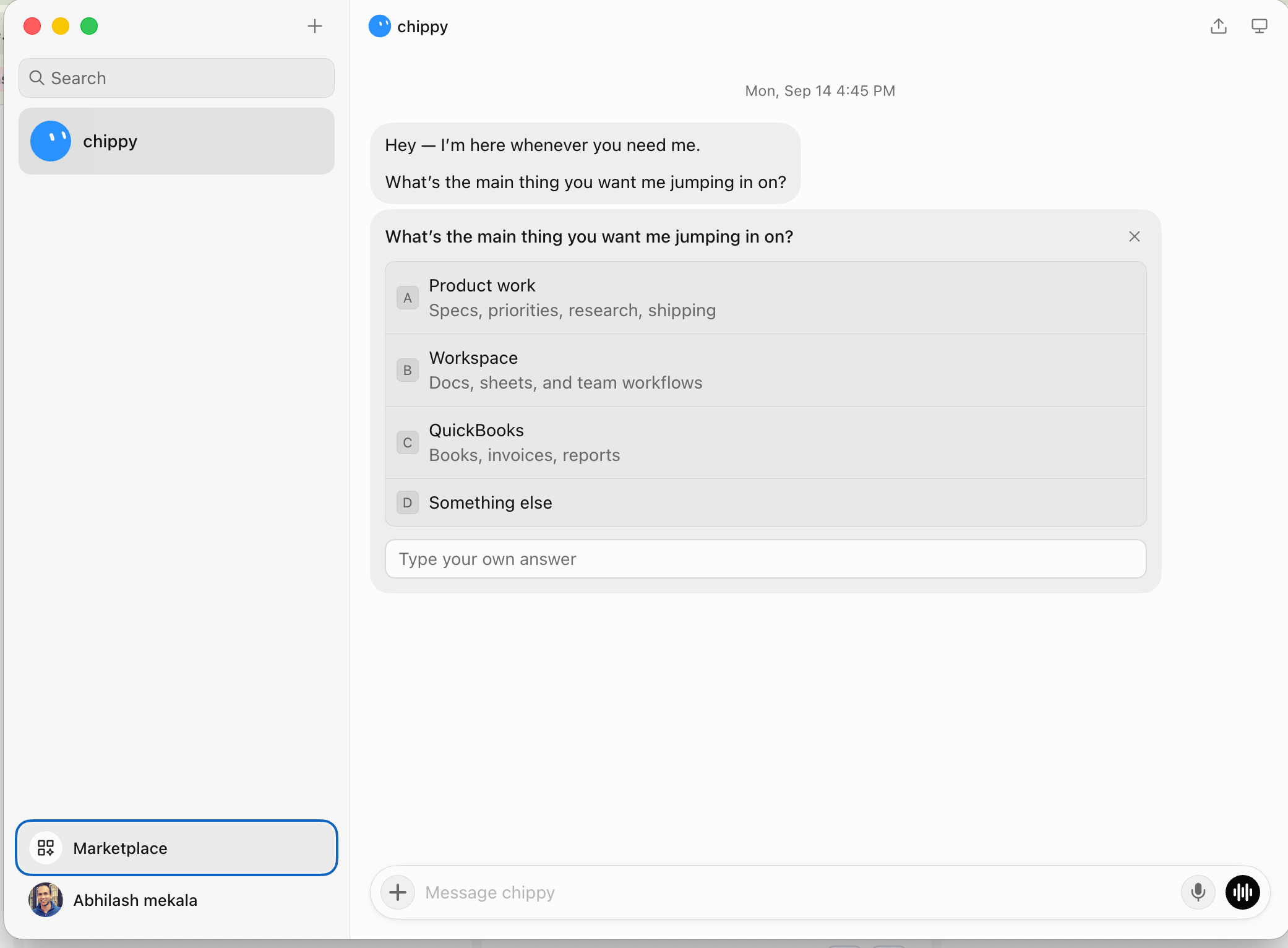 Search for **adspirer** and add it. It's the same reviewed [marketplace listing](https://cursor.com/marketplace/adspirer) that Cursor installs from.
When Grok Bot asks you to **Authorize**, finish the Adspirer sign-in in your browser. If it shows **Waiting for authorization**, use **Reopen** to bring the browser tab back.
Confirm Adspirer appears under **Installed**.
Connect the platforms you want the bot to manage at [adspirer.com/connections](https://www.adspirer.com/connections). The bot can only reach accounts you've connected there.
Which ad accounts am I connected to, and what did each one spend in the last 30 days?
If the bot answers with your real account names and real spend figures, you're connected.
## What You'll See After Installing
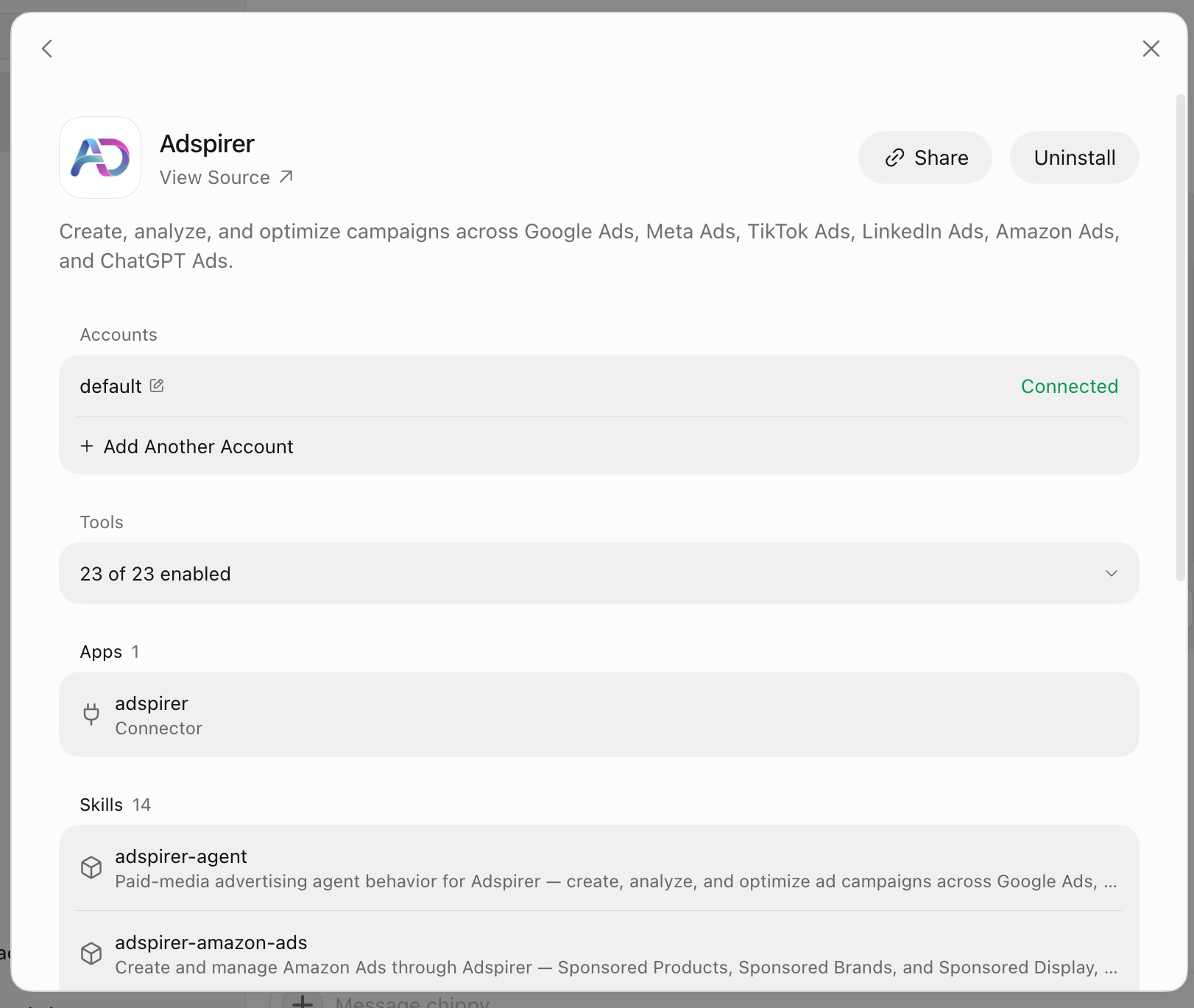
Open Adspirer from the Marketplace once it's installed and you get the whole surface on one screen — the shot at the top of this page. Four sections:
| Section | What it means |
| ------------ | -------------------------------------------------------------------------------------------------------------------------------------------------------------------------------------------- |
| **Accounts** | Your connected Adspirer account. **+ Add Another Account** connects a second one — useful if you keep client work on separate Adspirer logins. |
| **Tools** | The tools the bot may call. Adspirer's connector is a hub: the handful listed here reach the 400+ operations behind them, so "23 of 23 enabled" is the healthy state, not a partial install. |
| **Apps** | The `adspirer` connector itself — the MCP link to your ad accounts. |
| **Skills** | All 14 come across from the marketplace, same as in Cursor. The bot loads the right one from what you ask. |
Connecting an Adspirer account here is not the same as connecting your ad platforms. Those live at [adspirer.com/connections](https://www.adspirer.com/connections) — see [managing multiple accounts](/docs/knowledge-base/multi-account).
## What Your Bot Can Do
400+ tools across 6 ad platforms:
| Platform | Tools | Key Capabilities |
| ---------------- | ----- | ------------------------------------------------------------------------------------------------------------------------- |
| **Google Ads** | 156 | Keyword research, Search & PMax campaigns, wasted spend analysis, budget optimization, search term reports, ad extensions |
| **Amazon Ads** | 61 | Sponsored Products, Brands & Display, ASIN/keyword targeting, ACOS & ROAS analytics, budget recommendations |
| **LinkedIn Ads** | 55 | Sponsored content, B2B targeting (job titles, industries, company size), lead gen forms, creative analysis |
| **Meta Ads** | 60 | Image/video/carousel ads, audience targeting, placement optimization, creative fatigue detection |
| **TikTok Ads** | 37 | In-feed campaigns, asset validation, performance tracking |
| **ChatGPT Ads** | 36 | Pay-per-click chat-card ads inside ChatGPT responses, launch orchestrator, conversions (pixel + CAPI); created paused |
## Example Prompts
### Monday Morning Scorecard
Pull last week's performance from every connected platform. Give me one table with spend, conversions, CPA, and ROAS per platform, flag anything that moved more than 20% week over week, and end with the top 3 actions you'd take.
### Find Wasted Spend
Find wasted spend across all my platforms. Show me keywords with spend and zero conversions, Meta ads with rising frequency and falling CTR, and how much I'd save per month by cutting them. Don't change anything yet — just show me the list.
### Rewrite Underperforming Ad Copy
Find my lowest-CTR Google Search ad group, pull the search terms that actually converted in it over the last 60 days, and write 8 new headlines and 3 descriptions based on them. Keep to Google's character limits and my brand voice.
### Audit Before You Launch
Before I launch anything new, audit my conversion tracking on Google and Meta. Tell me which conversion actions are firing, which ones haven't recorded a conversion in 30 days, and what you'd fix first.
### Plan a New Channel
I have \$6,000/month to spend on demand gen for a B2B SaaS product selling to IT directors. Based on what my existing campaigns already tell us about cost and intent, recommend how to split that across Google Search, LinkedIn, and Meta. Then build the LinkedIn campaign paused so I can review it.
## Scheduled Reports With Routines
A routine tells one bot when to run a workflow — and it runs in the cloud, so your laptop can be closed. This is the reason to put ad reporting in Grok Bot rather than only in your editor.
Open the bot, choose **View conversation details**, then **Routines**.
Give the routine a name and the instruction you want run on a schedule:
```
Pull last week's performance from every connected Adspirer platform.
Post a scorecard: spend, conversions, CPA, ROAS per platform, week over
week. List anything that moved more than 20%. End with the top 3 actions.
Read-only — do not change any campaign.
```
Open **When to run** and pick a schedule — **Every day**, **Weekdays**, **Every week**, **Every month**, or an interval. The clock time follows the **Timezone** in the bot's settings, not your browser's.
An inactive routine stays saved and never fires. Saving doesn't run it either — the first run is the next matching time.
Every run spends Adspirer tool calls and Grok Bot usage. A weekly scorecard is cheap; an hourly one is not. Start weekly, check the run history, and widen or narrow from there. See [pricing](/docs/knowledge-base/pricing) for your tool call allowance.
Adspirer also has its own scheduling tools, which deliver briefs independently of any client. See [scheduled tasks](/docs/guides/scheduled-tasks) for when to use which.
## Safety
* **Campaigns are created paused.** Nothing spends until you enable it.
* **Read each approval card.** Grok Bot shows one before a tool takes action. Use **Allow once** while you learn how the bot handles a workflow, and **Deny** when the proposed action isn't what you asked for.
* **Spend-affecting writes stop for confirmation** — campaign creation, budget changes, bid changes.
* **Campaigns are never deleted automatically.**
* **Never paste credentials into chat.** Adspirer uses OAuth, so it never asks for one. Your ad platform credentials stay server-side with Adspirer and are scoped to the accounts you connect.
## Grok Bot vs. Cursor
Same plugin, same marketplace listing, two different products. Installing in one does not install in the other.
| | **Grok Bot** | **[Cursor](/docs/ai-clients/cursor)** |
| ------------------------ | ------------------------------------------------------------------ | --------------------------------------------------- |
| **Where it runs** | Cloud — desktop, web, mobile | Your machine, inside the editor |
| **Install from** | **Marketplace** in the sidebar | **Customize** in the sidebar |
| **Scheduling** | Routines, run in the cloud | Adspirer's own scheduling tools |
| **Brand context** | The bot's description | `BRAND.md` and `STRATEGY.md` in your project folder |
| **Skills** | All 14 | All 14 |
| **Workflow enforcement** | What you write in the description | Two rules that load automatically |
| **Best for** | Recurring reporting and optimization you want to arrive on its own | Hands-on campaign building alongside your files |
All 14 skills install in Grok Bot. What doesn't come across is the subagent and the two `.mdc` rules — those are Cursor plugin components. In Grok Bot the bot's description does that job, which is why the setup step above is worth filling in properly rather than leaving generic.
## Troubleshooting
| Problem | Solution |
| ---------------------------------------------------- | ------------------------------------------------------------------------------------------------------------------------------------------------------------------------ |
| Adspirer isn't in the plugin list | Search `adspirer` (lowercase, one word) in **Marketplace**. |
| "Disabled by team admin" | If you use Grok Bot through a Cursor team, your Cursor team admin controls which marketplace plugins are available. Ask them to enable Adspirer. |
| Stuck on "Waiting for authorization" | Use **Reopen** to bring the browser tab back and finish signing in. |
| Plugin added but no ad data | Connect your platforms at [adspirer.com/connections](https://www.adspirer.com/connections) — installing the plugin doesn't connect accounts. |
| Bot answers from memory instead of live data | Add "always pull live data before answering a performance question" to the bot's description. |
| Routine saved but **Run history** says "No runs yet" | Saving doesn't create a run. Check **Active** is on and wait for the next matching time, or use **Test run** — which does real work, so give it a read-only instruction. |
| Wrong time on a scheduled report | Schedules follow the **Timezone** in the bot's settings, not your browser's. |
| Rate limit hit | See [pricing](/docs/knowledge-base/pricing) for your plan's tool call allowance. |
## FAQ
No. Grok Bot signs in with a Cursor account and installs from the Cursor Marketplace, but it runs on its own — desktop, web, or mobile. You never have to open the editor.
No. Install it once in each. They're separate products that share a marketplace.
It can reach every ad account connected to your Adspirer account, so technically yes — but a bot holds one role and one set of context. For agency work, give each client its own bot with its own description. See [multi-client](/docs/knowledge-base/multi-client).
No. Campaigns are created paused, and spend-affecting actions stop for an approval card. The bot proposes; you approve.
Pricing is based on tool calls, not ad spend, and it's the same across every AI client. Scheduled routines consume tool calls on every run. See [pricing and plans](/docs/knowledge-base/pricing).
## Related Documentation
* [Cursor Setup](/docs/ai-clients/cursor) — the same plugin in the editor
* [Cursor Agent](/docs/agent-skills/cursor-agent) — what's in the plugin and how the pieces fit
* [Scheduled Tasks](/docs/guides/scheduled-tasks) — recurring reports and monitoring
* [Google Ads Integration Guide](/docs/ad-platforms/google-ads)
* [Pricing & Plans](/docs/knowledge-base/pricing)
* [All Documentation](/docs/introduction)
Search for **adspirer** and add it. It's the same reviewed [marketplace listing](https://cursor.com/marketplace/adspirer) that Cursor installs from.
When Grok Bot asks you to **Authorize**, finish the Adspirer sign-in in your browser. If it shows **Waiting for authorization**, use **Reopen** to bring the browser tab back.
Confirm Adspirer appears under **Installed**.
Connect the platforms you want the bot to manage at [adspirer.com/connections](https://www.adspirer.com/connections). The bot can only reach accounts you've connected there.
Which ad accounts am I connected to, and what did each one spend in the last 30 days?
If the bot answers with your real account names and real spend figures, you're connected.
## What You'll See After Installing
Open Adspirer from the Marketplace once it's installed and you get the whole surface on one screen — the shot at the top of this page. Four sections:
| Section | What it means |
| ------------ | -------------------------------------------------------------------------------------------------------------------------------------------------------------------------------------------- |
| **Accounts** | Your connected Adspirer account. **+ Add Another Account** connects a second one — useful if you keep client work on separate Adspirer logins. |
| **Tools** | The tools the bot may call. Adspirer's connector is a hub: the handful listed here reach the 400+ operations behind them, so "23 of 23 enabled" is the healthy state, not a partial install. |
| **Apps** | The `adspirer` connector itself — the MCP link to your ad accounts. |
| **Skills** | All 14 come across from the marketplace, same as in Cursor. The bot loads the right one from what you ask. |
Connecting an Adspirer account here is not the same as connecting your ad platforms. Those live at [adspirer.com/connections](https://www.adspirer.com/connections) — see [managing multiple accounts](/docs/knowledge-base/multi-account).
## What Your Bot Can Do
400+ tools across 6 ad platforms:
| Platform | Tools | Key Capabilities |
| ---------------- | ----- | ------------------------------------------------------------------------------------------------------------------------- |
| **Google Ads** | 156 | Keyword research, Search & PMax campaigns, wasted spend analysis, budget optimization, search term reports, ad extensions |
| **Amazon Ads** | 61 | Sponsored Products, Brands & Display, ASIN/keyword targeting, ACOS & ROAS analytics, budget recommendations |
| **LinkedIn Ads** | 55 | Sponsored content, B2B targeting (job titles, industries, company size), lead gen forms, creative analysis |
| **Meta Ads** | 60 | Image/video/carousel ads, audience targeting, placement optimization, creative fatigue detection |
| **TikTok Ads** | 37 | In-feed campaigns, asset validation, performance tracking |
| **ChatGPT Ads** | 36 | Pay-per-click chat-card ads inside ChatGPT responses, launch orchestrator, conversions (pixel + CAPI); created paused |
## Example Prompts
### Monday Morning Scorecard
Pull last week's performance from every connected platform. Give me one table with spend, conversions, CPA, and ROAS per platform, flag anything that moved more than 20% week over week, and end with the top 3 actions you'd take.
### Find Wasted Spend
Find wasted spend across all my platforms. Show me keywords with spend and zero conversions, Meta ads with rising frequency and falling CTR, and how much I'd save per month by cutting them. Don't change anything yet — just show me the list.
### Rewrite Underperforming Ad Copy
Find my lowest-CTR Google Search ad group, pull the search terms that actually converted in it over the last 60 days, and write 8 new headlines and 3 descriptions based on them. Keep to Google's character limits and my brand voice.
### Audit Before You Launch
Before I launch anything new, audit my conversion tracking on Google and Meta. Tell me which conversion actions are firing, which ones haven't recorded a conversion in 30 days, and what you'd fix first.
### Plan a New Channel
I have \$6,000/month to spend on demand gen for a B2B SaaS product selling to IT directors. Based on what my existing campaigns already tell us about cost and intent, recommend how to split that across Google Search, LinkedIn, and Meta. Then build the LinkedIn campaign paused so I can review it.
## Scheduled Reports With Routines
A routine tells one bot when to run a workflow — and it runs in the cloud, so your laptop can be closed. This is the reason to put ad reporting in Grok Bot rather than only in your editor.
Open the bot, choose **View conversation details**, then **Routines**.
Give the routine a name and the instruction you want run on a schedule:
```
Pull last week's performance from every connected Adspirer platform.
Post a scorecard: spend, conversions, CPA, ROAS per platform, week over
week. List anything that moved more than 20%. End with the top 3 actions.
Read-only — do not change any campaign.
```
Open **When to run** and pick a schedule — **Every day**, **Weekdays**, **Every week**, **Every month**, or an interval. The clock time follows the **Timezone** in the bot's settings, not your browser's.
An inactive routine stays saved and never fires. Saving doesn't run it either — the first run is the next matching time.
Every run spends Adspirer tool calls and Grok Bot usage. A weekly scorecard is cheap; an hourly one is not. Start weekly, check the run history, and widen or narrow from there. See [pricing](/docs/knowledge-base/pricing) for your tool call allowance.
Adspirer also has its own scheduling tools, which deliver briefs independently of any client. See [scheduled tasks](/docs/guides/scheduled-tasks) for when to use which.
## Safety
* **Campaigns are created paused.** Nothing spends until you enable it.
* **Read each approval card.** Grok Bot shows one before a tool takes action. Use **Allow once** while you learn how the bot handles a workflow, and **Deny** when the proposed action isn't what you asked for.
* **Spend-affecting writes stop for confirmation** — campaign creation, budget changes, bid changes.
* **Campaigns are never deleted automatically.**
* **Never paste credentials into chat.** Adspirer uses OAuth, so it never asks for one. Your ad platform credentials stay server-side with Adspirer and are scoped to the accounts you connect.
## Grok Bot vs. Cursor
Same plugin, same marketplace listing, two different products. Installing in one does not install in the other.
| | **Grok Bot** | **[Cursor](/docs/ai-clients/cursor)** |
| ------------------------ | ------------------------------------------------------------------ | --------------------------------------------------- |
| **Where it runs** | Cloud — desktop, web, mobile | Your machine, inside the editor |
| **Install from** | **Marketplace** in the sidebar | **Customize** in the sidebar |
| **Scheduling** | Routines, run in the cloud | Adspirer's own scheduling tools |
| **Brand context** | The bot's description | `BRAND.md` and `STRATEGY.md` in your project folder |
| **Skills** | All 14 | All 14 |
| **Workflow enforcement** | What you write in the description | Two rules that load automatically |
| **Best for** | Recurring reporting and optimization you want to arrive on its own | Hands-on campaign building alongside your files |
All 14 skills install in Grok Bot. What doesn't come across is the subagent and the two `.mdc` rules — those are Cursor plugin components. In Grok Bot the bot's description does that job, which is why the setup step above is worth filling in properly rather than leaving generic.
## Troubleshooting
| Problem | Solution |
| ---------------------------------------------------- | ------------------------------------------------------------------------------------------------------------------------------------------------------------------------ |
| Adspirer isn't in the plugin list | Search `adspirer` (lowercase, one word) in **Marketplace**. |
| "Disabled by team admin" | If you use Grok Bot through a Cursor team, your Cursor team admin controls which marketplace plugins are available. Ask them to enable Adspirer. |
| Stuck on "Waiting for authorization" | Use **Reopen** to bring the browser tab back and finish signing in. |
| Plugin added but no ad data | Connect your platforms at [adspirer.com/connections](https://www.adspirer.com/connections) — installing the plugin doesn't connect accounts. |
| Bot answers from memory instead of live data | Add "always pull live data before answering a performance question" to the bot's description. |
| Routine saved but **Run history** says "No runs yet" | Saving doesn't create a run. Check **Active** is on and wait for the next matching time, or use **Test run** — which does real work, so give it a read-only instruction. |
| Wrong time on a scheduled report | Schedules follow the **Timezone** in the bot's settings, not your browser's. |
| Rate limit hit | See [pricing](/docs/knowledge-base/pricing) for your plan's tool call allowance. |
## FAQ
No. Grok Bot signs in with a Cursor account and installs from the Cursor Marketplace, but it runs on its own — desktop, web, or mobile. You never have to open the editor.
No. Install it once in each. They're separate products that share a marketplace.
It can reach every ad account connected to your Adspirer account, so technically yes — but a bot holds one role and one set of context. For agency work, give each client its own bot with its own description. See [multi-client](/docs/knowledge-base/multi-client).
No. Campaigns are created paused, and spend-affecting actions stop for an approval card. The bot proposes; you approve.
Pricing is based on tool calls, not ad spend, and it's the same across every AI client. Scheduled routines consume tool calls on every run. See [pricing and plans](/docs/knowledge-base/pricing).
## Related Documentation
* [Cursor Setup](/docs/ai-clients/cursor) — the same plugin in the editor
* [Cursor Agent](/docs/agent-skills/cursor-agent) — what's in the plugin and how the pieces fit
* [Scheduled Tasks](/docs/guides/scheduled-tasks) — recurring reports and monitoring
* [Google Ads Integration Guide](/docs/ad-platforms/google-ads)
* [Pricing & Plans](/docs/knowledge-base/pricing)
* [All Documentation](/docs/introduction)