How to Submit a ChatGPT App in 2026: Step-by-Step Developer Guide
Adspirer Team

A complete walkthrough of submitting an app to the ChatGPT Apps marketplace, covering every step from icon prep to test cases. Based on first-hand experience submitting an MCP server with 36 tools, including the gotchas around OAuth state length, annotation formats, and domain verification.
OpenAI just opened the ChatGPT Apps marketplace to developers. I went through the entire submission process for an MCP server I built, and I’m documenting everything while it’s fresh.
This guide covers every step of the submission process, the gotchas I hit, and exactly what you need to prepare before submitting your ChatGPT app.
What Are ChatGPT Apps?
ChatGPT Apps (formerly called “Connectors”) are third-party integrations that extend ChatGPT’s capabilities. Using the Model Context Protocol (MCP), developers can build apps that let ChatGPT:
- Access external APIs and data sources
- Perform actions in other platforms
- Connect to business tools and services
Think of it like an app store for ChatGPT—users can install apps that give the AI new abilities. If you’re weighing whether to build an app at all, it’s worth understanding how ChatGPT Apps compare to Custom GPTs for advertising use cases before committing to the submission process below.
What I Built
I built Adspirer, an MCP server that connects ChatGPT to advertising platforms. Users can manage Google Ads, TikTok Ads, and Meta Ads campaigns directly from ChatGPT conversations.
The server includes 36 tools for things like:
- Creating ad campaigns with natural language
- Analyzing campaign performance
- Researching keywords with real CPC data
- Pausing or enabling campaigns
This gave me a comprehensive test case for the submission process—multiple OAuth scopes, complex tool annotations, and real API integrations.
The Complete ChatGPT App Submission Process
Here’s every step I went through to submit my app to the ChatGPT marketplace.
App Icons
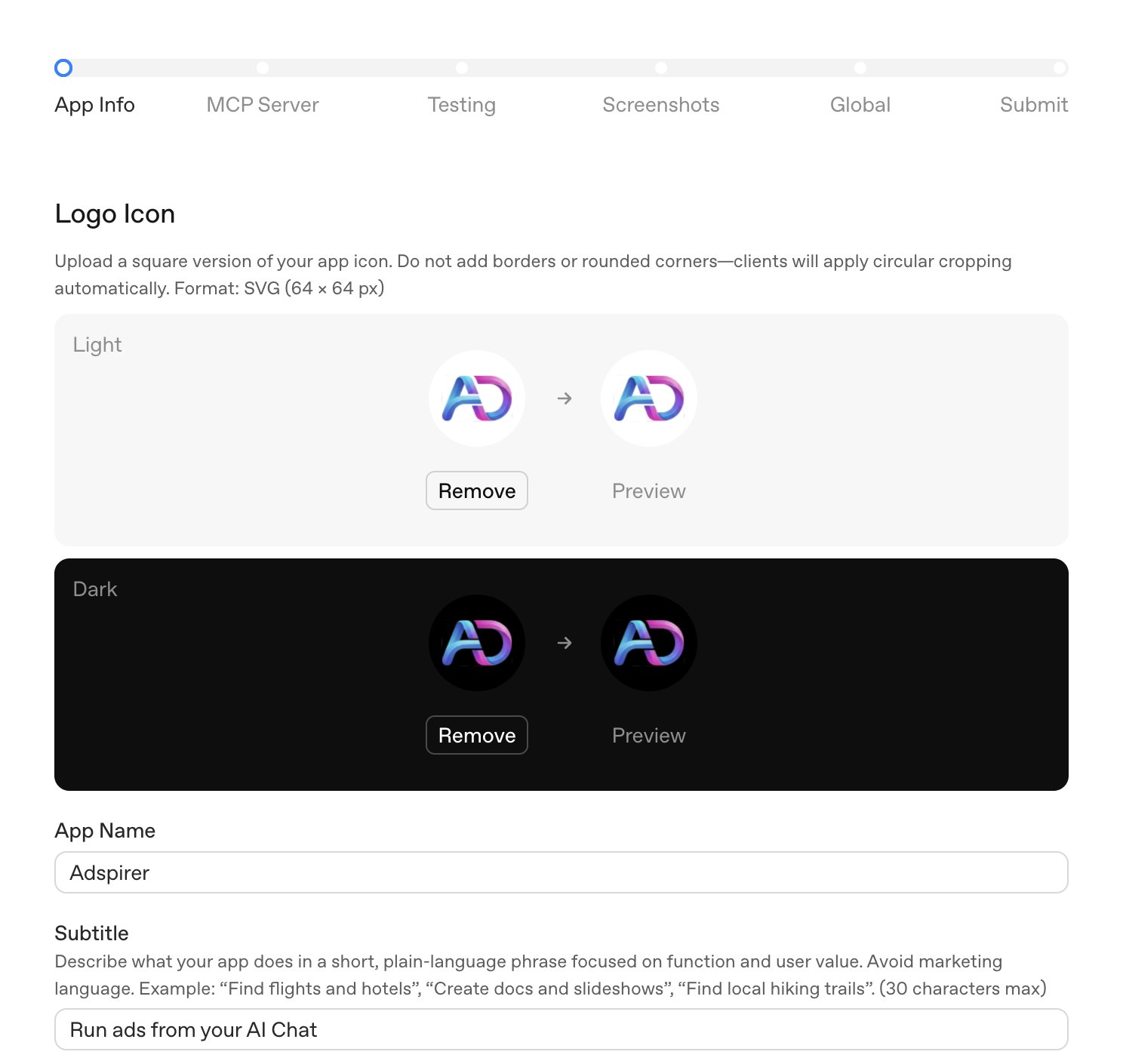
You need two icon versions:
| Icon Type | Purpose |
|---|---|
| Light mode icon | Displays when user has light ChatGPT theme |
| Dark mode icon | Displays when user has dark ChatGPT theme |
Both should be square, high-resolution, and clearly represent your app’s purpose.
App Details
The submission form requires:
- App name: Keep it short and memorable
- Short description: One-liner that appears in search results
- Long description: Full explanation of what your app does
- Category: Pick the closest match from OpenAI’s categories
- Privacy Policy URL: Required, must be live and accessible
- Terms of Service URL: Required, must be live and accessible
MCP Server Configuration
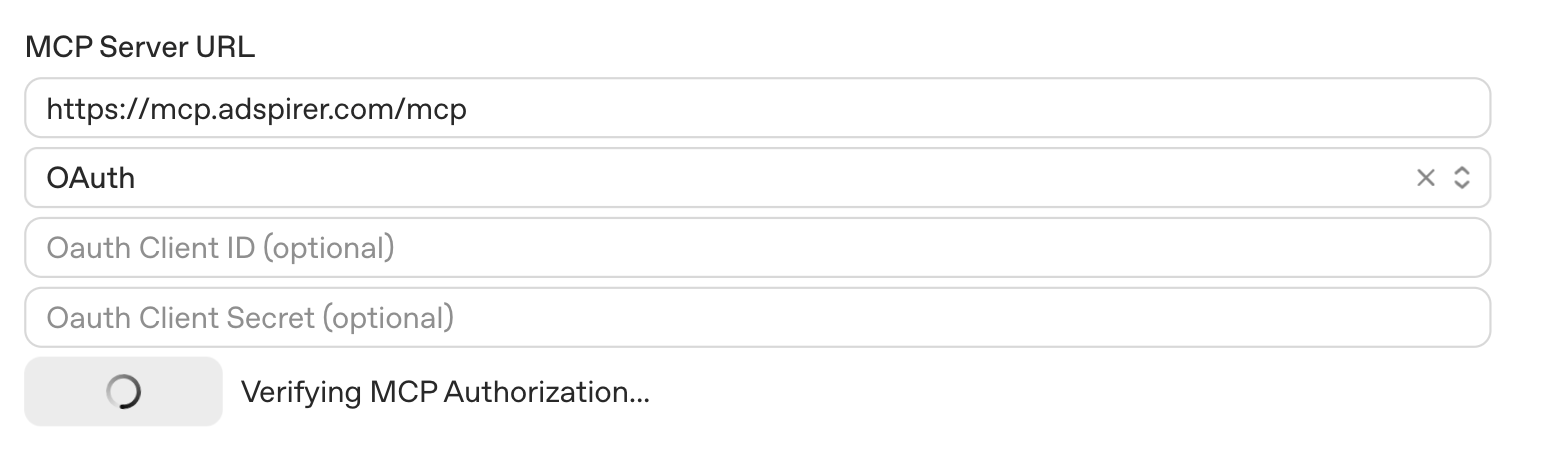
Enter your MCP server URL. For example:
https://mcp.yourdomain.com/mcpYour server must be publicly accessible via HTTPS. During development, you can use ngrok or Cloudflare Tunnel, but for submission you need a production endpoint.
Select OAuth as the authentication method (this is required for most apps that access user data).
Domain Verification
OpenAI needs to verify you own the domain hosting your MCP server. They provide a verification token that you must serve at:
GET /.well-known/openai-apps-challengeThe endpoint must return the token as plain text (not JSON, not HTML).
Here’s how to implement it in FastAPI:
from fastapi import FastAPIfrom fastapi.responses import PlainTextResponse
app = FastAPI()
@app.get("/.well-known/openai-apps-challenge")async def openai_apps_challenge():    return PlainTextResponse(        content="your-verification-token-here",        media_type="text/plain"    )
For Express.js:
app.get('/.well-known/openai-apps-challenge', (req, res) => { res.type('text/plain').send('your-verification-token-here');});OpenAI pings this endpoint immediately when you submit — make sure it’s deployed before you click submit.
OAuth Setup
Add OpenAI’s redirect URI to your OAuth configuration:
https://platform.openai.com/apps-manage/oauthThis is in addition to any ChatGPT redirect URIs you already have (like https://chatgpt.com/connector_platform_oauth_redirect).
OAuth State Parameter Warning: OpenAI’s OAuth state parameter is massive — 400+ characters of base64-encoded JSON. If you’re storing the state parameter in a database during the OAuth handshake, make sure your column can handle it.
-- This will break:state VARCHAR(255)
-- Use this instead:state TEXT
My VARCHAR(255) column silently truncated the state, causing authentication failures with no helpful error messages.
Additional .well-known Endpoints
While testing, I noticed OpenAI’s servers looking for several endpoints I didn’t have (showed as 404s in my logs):
/.well-known/oauth-protected-resource/.well-known/oauth-protected-resource/mcp/oauth/token/.well-known/openid-configurationI added handlers for all of them to eliminate the 404s. Whether they’re strictly required is unclear, but having them doesn’t hurt.
Tool Scanning and Annotations
Click “Scan Tools” in the submission form. OpenAI calls your MCP server’s tools/list method and displays all available tools.
Your tools need proper annotations in the MCP response. If you’re using underscore-prefixed keys internally (like _readOnlyHint), transform them to the proper annotations object before returning. OpenAI reads the annotations object specifically.
Here’s the expected format:
{ "name": "create_campaign", "description": "Creates a new advertising campaign", "inputSchema": { "type": "object", "properties": { "campaign_name": {"type": "string"}, "budget": {"type": "number"} } }, "annotations": { "title": "Create Campaign", "readOnlyHint": false, "destructiveHint": false, "openWorldHint": true }}Tool Justifications
For every single tool, you must manually explain three things:
Read Only — Does the tool only read data, or does it modify something?
Example: “This tool only retrieves campaign performance metrics. It does not modify any campaigns or settings.”
Open World — Does the tool interact with external systems?
Example: “Yes, this tool connects to the Google Ads API to fetch real-time performance data.”
Destructive — Can the tool delete or irreversibly modify data?
Example: “No, this tool creates campaigns additively. It does not delete existing campaigns or data.”
With 36 tools, this section took me about an hour. Be accurate — incorrect annotations can get your app rejected.
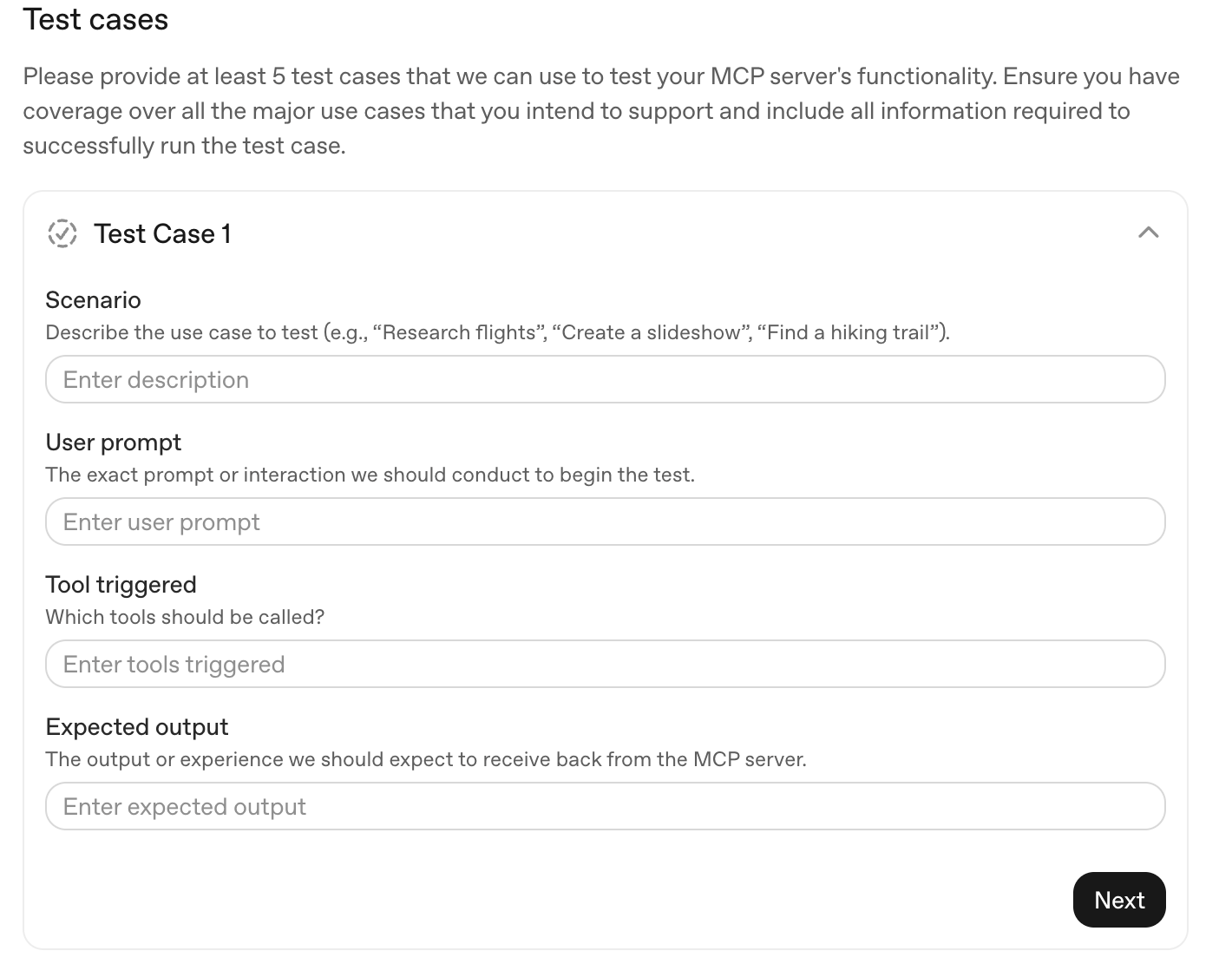
Test Cases (Minimum 5)
OpenAI reviewers will actually test your app using these scenarios. For each test case, provide:
| Field | Description |
|---|---|
| Scenario | What the user is trying to accomplish |
| User Prompt | The exact prompt to test |
| Tool Triggered | Which tool(s) should be called |
| Expected Output | What the response should contain |
Example Test Case:
- Scenario: Research keywords for a plumbing business
- User Prompt: “Use the research_keywords tool to find keyword ideas for a plumber in Houston, Texas”
- Tool Triggered:
research_keywords - Expected Output: List of keywords with search volume and CPC data for plumbing-related terms in Houston
Use specific, realistic prompts that will reliably trigger the correct tools.
Negative Test Cases (Minimum 3)
These are prompts where your app should NOT trigger. This helps OpenAI’s routing system avoid false positives.
Example Negative Cases:
-
Scenario: User asks for general marketing advice
- Prompt: “What are some good marketing strategies for a small business?”
- Why it shouldn’t trigger: No specific ad platform action requested
-
Scenario: User asks about unsupported platforms
- Prompt: “Help me set up LinkedIn Ads campaigns”
- Why it shouldn’t trigger: LinkedIn Ads not supported
-
Scenario: Casual conversation
- Prompt: “Hello, how are you today?”
- Why it shouldn’t trigger: Not an advertising request
Testing Instructions
Write clear instructions for OpenAI reviewers:
- Credentials: Provide a test email and password
- Connection Steps: Explain how to add your MCP server via Settings → Apps & Connectors
- Sample Prompts: Give copy-pasteable prompts that demonstrate key features
- Account State: Mention if the test account has pre-configured data (so reviewers don’t hit empty states)
“The test account is pre-connected to a Google Ads account with sample campaigns. After connecting, try: ‘Show me my campaign performance for the last 7 days’”
Release Notes
For initial submissions, describe what your app can do:
Adspirer v1.0 - Initial Release
Features:- Research keywords with real CPC and volume data- Create Search and Performance Max campaigns- Analyze campaign performance metrics- Pause/enable campaigns with natural language
Supported Platforms:- Google Ads- TikTok Ads- Meta Ads
Common Issues and How I Fixed Them
Submission Checklist
Before you click submit, verify:
- Light and dark mode icons uploaded
- Privacy Policy URL is live and accessible
- Terms of Service URL is live and accessible
- MCP server is publicly accessible via HTTPS
- Domain verification endpoint returns plain text token
- OAuth redirect URI includes OpenAI’s URL
- Database can store 500+ character OAuth state
- All tools have proper
annotationsobject - Tool justifications completed for every tool
- At least 5 positive test cases with specific prompts
- At least 3 negative test cases
- Test account credentials ready for reviewers
- Release notes written
What Happens After Submission
Now I wait. OpenAI reviews submissions manually, though they haven’t published expected timelines.
I’ll update this post when I hear back about approval (or rejection and what I needed to fix).
Resources
- OpenAI: Introducing Apps in ChatGPT
- OpenAI: Developers Can Now Submit Apps
- OpenAI Developer Platform
- MCP Specification
Building an MCP server for advertising? Adspirer connects ChatGPT and Claude to Google Ads, Meta Ads, Amazon Ads, ChatGPT Ads, LinkedIn Ads, and TikTok Ads — and, since May 2026, ships as an official ChatGPT App Store app. Try it free.
Join the Discussion
Have questions about the submission process? Follow me on X for updates on the approval process and tips as I learn them.
Related Articles
More articles to read

How to Build a Claude Connector: MCP Server Tutorial (2026)
Step-by-step guide to building a Claude connector using MCP. Create custom tools that connect Claude to your APIs, databases, and services.
Claude Code for Google & Meta Ads: Agent Setup (2026)
Use Claude Code for Google Ads and Meta Ads: install the Adspirer plugin, use a terminal workflow, set guardrails, audit, and build paused campaigns.
Meta Ads MCP Server: Official vs Cross-Platform (2026)
Compare Meta Ads MCP server options for Facebook and Instagram Ads: Meta's official hosted server and managed cross-platform connections for AI clients.
![How to Run Facebook & Instagram Ads with ChatGPT [2026]](/blog/_astro/hero-connect-chatgpt-meta-ads.CCw3jIau_1T7gqc.webp)
How to Run Facebook & Instagram Ads with ChatGPT [2026]
Use ChatGPT for Facebook Ads: connect to Meta Ads, create campaigns, analyze performance, and optimize budgets — step-by-step setup guide with prompts.