ChatGPT users: the Adspirer plugin is behind. For Amazon Ads, ChatGPT Ads, Google Analytics, and Google Search Console, add a custom MCP app — it takes two minutes. How →
ChatGPT users: the Adspirer plugin is behind. For Amazon Ads, ChatGPT Ads, Google Analytics, and Google Search Console, add a custom MCP app — it takes two minutes. How →
The Best Way to Set Up Your Project (Claude Cowork, ChatGPT, Claude Code, Codex)
The best way to set up an ad-ops project in Claude Cowork, ChatGPT, Claude Code, or Codex Desktop: one project per ad platform, agent instructions, agent context, scheduled tasks and routines, and agent skills — plus the Adspirer playbook that fills them in for you.
The best way to run ads with an AI assistant is not a chat. It is a project: a persistent
workspace where the agent already knows your business, your accounts, your rules, and your goals
before you type a word. Claude Cowork, ChatGPT, Claude Code, and Codex Desktop all have one. The
names differ; the shape is the same.
Pick your client and follow the numbered steps. Each one puts the same five things in place: one project per ad platform, agent instructions, agent context, scheduled tasks, and agent skills. What each part is for is explained further down.For the folder-based clients (Claude Code Desktop, Claude Code Terminal, Codex Desktop) the whole
install is one move: download the kit .zip from Expert Space, attach it to a chat, and send the
install prompt. The agent unzips it, puts the skill where it loads skills from, checks that Adspirer
is connected, and updates its own instructions and memory so every future session knows the expert
exists. You never copy a file by hand.
Claude Cowork
ChatGPT
Claude Code Desktop
Claude Code Terminal
Codex Desktop
Cowork has a dedicated field for every one of the five parts. Requires Claude Max, Team, or
Enterprise, and the Adspirer plugin added from Customize → Plugins (Anthropic Directory)
(setup).
1
Open Cowork
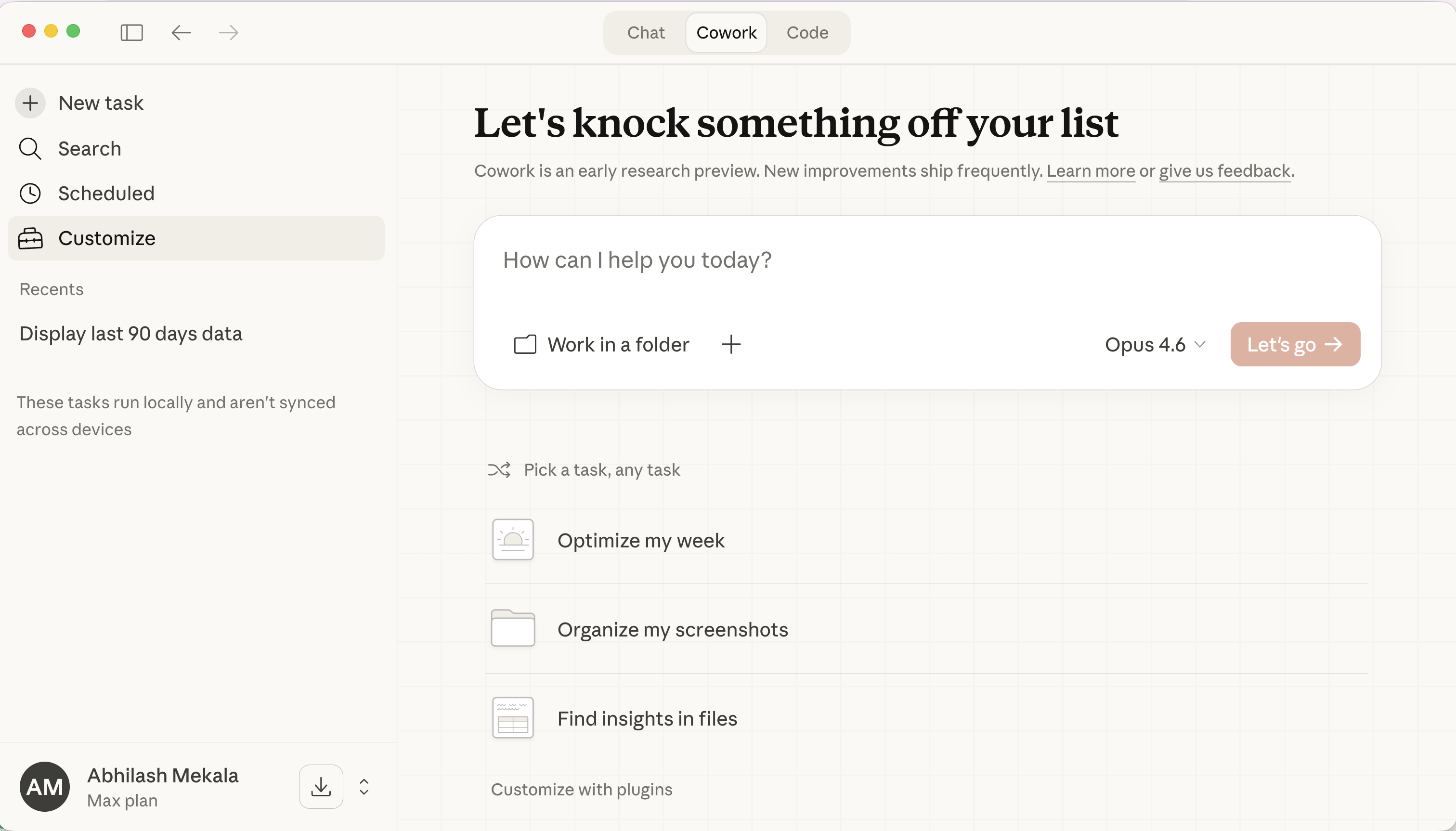
In the Claude desktop app (or claude.ai), click the Cowork tab at the top.
The Cowork tab in the Claude desktop app
2
Create one project per platform
Click + next to Projects in the left sidebar. Start from scratch or use an
existing folder on your computer; pointing it at a folder that already holds your brand
documents is the fastest route. Name it “Brand — Google Ads”.
3
Paste the agent instructions
Open the project’s Instructions panel and paste your instructions: the template below,
or the kit’s AGENTS.md (the kit page’s Copy instructions button puts it on your
clipboard). Every task and every scheduled run in the project inherits them.
4
Add context to the Context folder
Drop your business docs, exemplars, P&L summary, marketing docs, past-test log, and the
kit’s references/account-profile.md into the project’s Context folder. Run /setup
once and the plugin scans the folder, pulls live campaign data, and writes a brand context
file alongside them. Leave Memory on.
5
Upload the skill
Click Customize in the left sidebar, open Skills, and upload the kit .zip as-is.
It sits next to the skills the Adspirer plugin installed: those cover advertising in
general, this one covers your account.
6
Confirm Adspirer and a notification channel
In Customize → Connectors, confirm Adspirer Ads & Performance Marketing Agent (the
Anthropic-verified connector the plugin installs) shows connected, and link
the ad accounts for this platform only. Set Interactive and Read-only tools to Always
allow and leave Write/delete on Needs approval. Add Slack or email so scheduled runs
can report.
7
Schedule the routines
In a chat inside the project, ask for the routine and Cowork offers to schedule it with
/schedule. It appears in the Scheduled panel and runs remotely, laptop closed or not.
Start with the weekly dashboard, read-only.
The full Cowork build, including the seven-property safety model for self-optimizing tasks, is
in Cowork for Ad Ops.
Projects, files, plugins, and skills all live in ChatGPT’s Work mode. Connect the Adspirer
app first (setup); Projects are on Plus, Pro, Business, and Enterprise.
1
Switch to Work
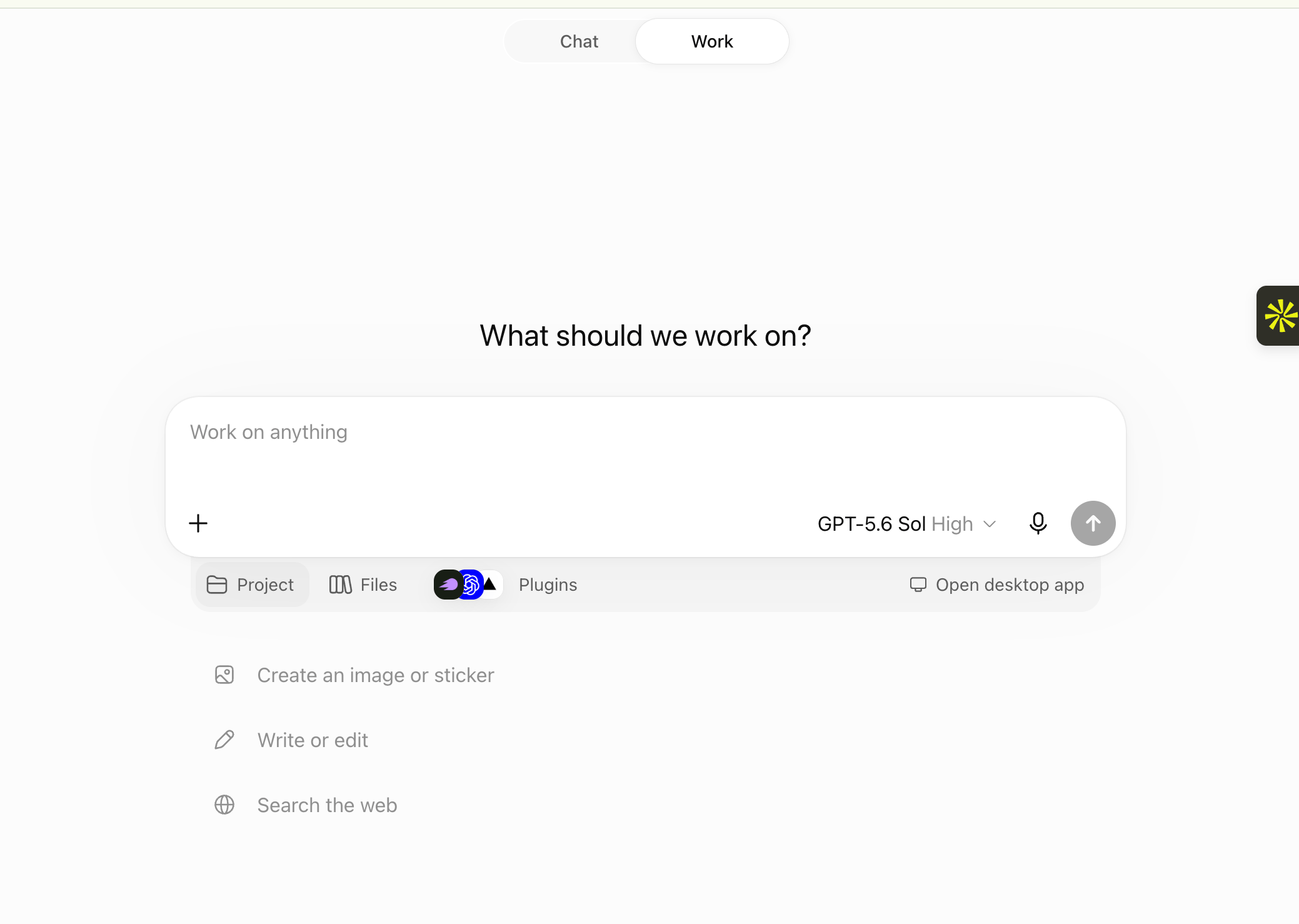
At the top of ChatGPT, flip the toggle from Chat to Work. The composer gains three
chips underneath it: Project, Files, and Plugins. Everything below happens here.
Work mode: the Project, Files, and Plugins chips under the composer
2
Create one project per platform
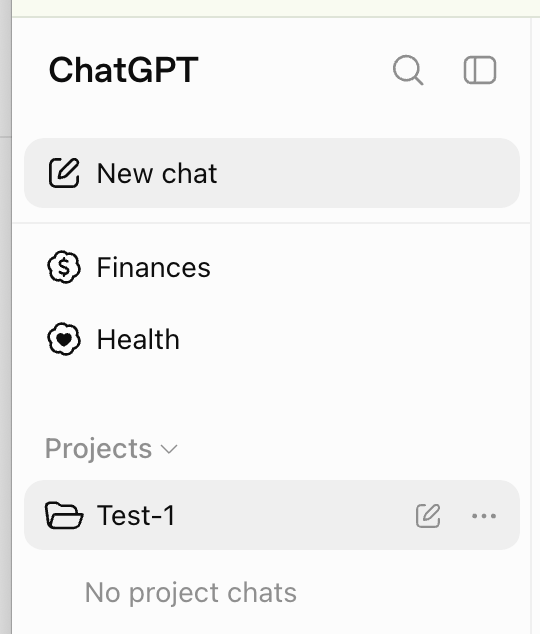
In the left sidebar, under Projects, create a new project and name it for the platform:
“Brand — Google Ads”. Every chat you start inside it inherits the instructions, files, and
plugins you set up next.
Projects in the ChatGPT sidebar
3
Open Project settings
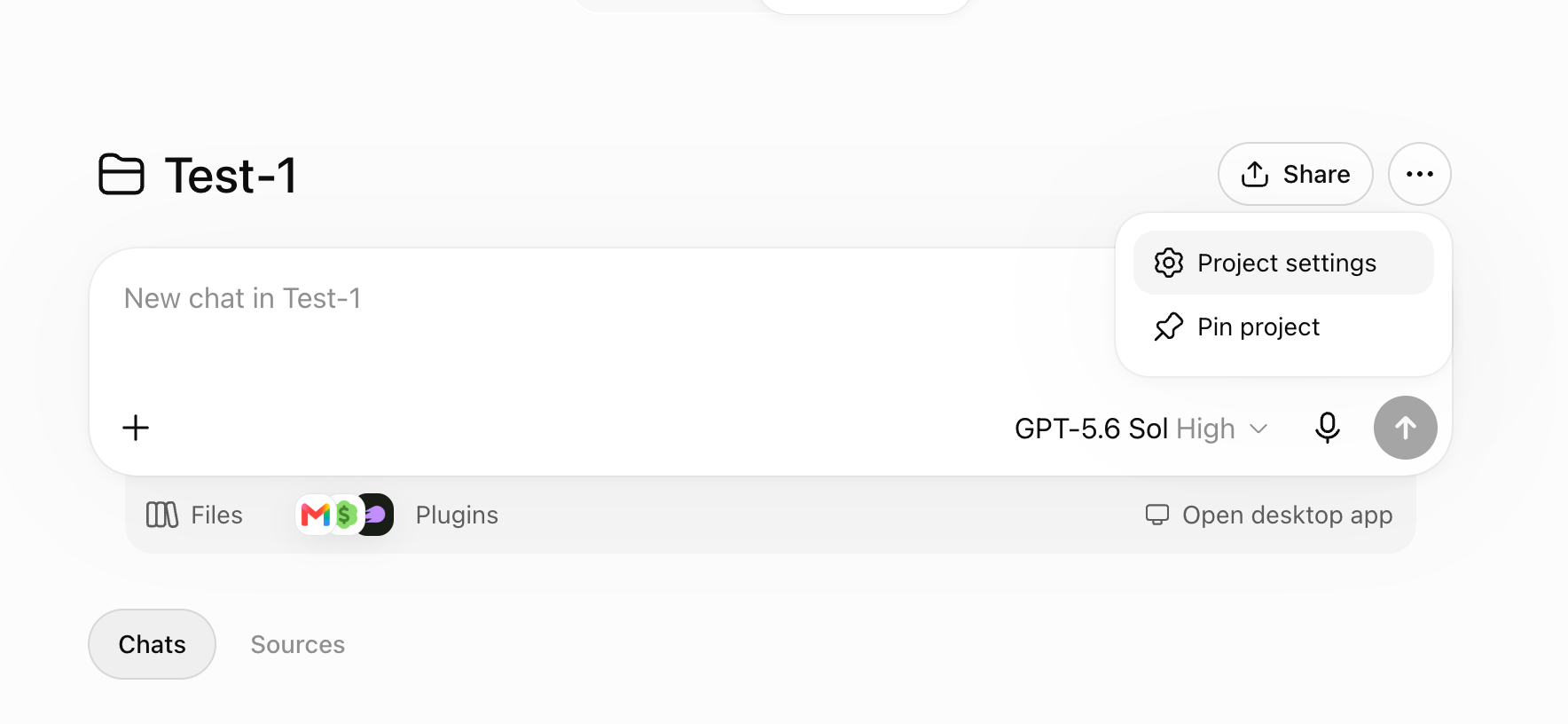
Open the project, click the ⋯ menu at the top right, and choose Project settings.
The ⋯ menu on a project page
4
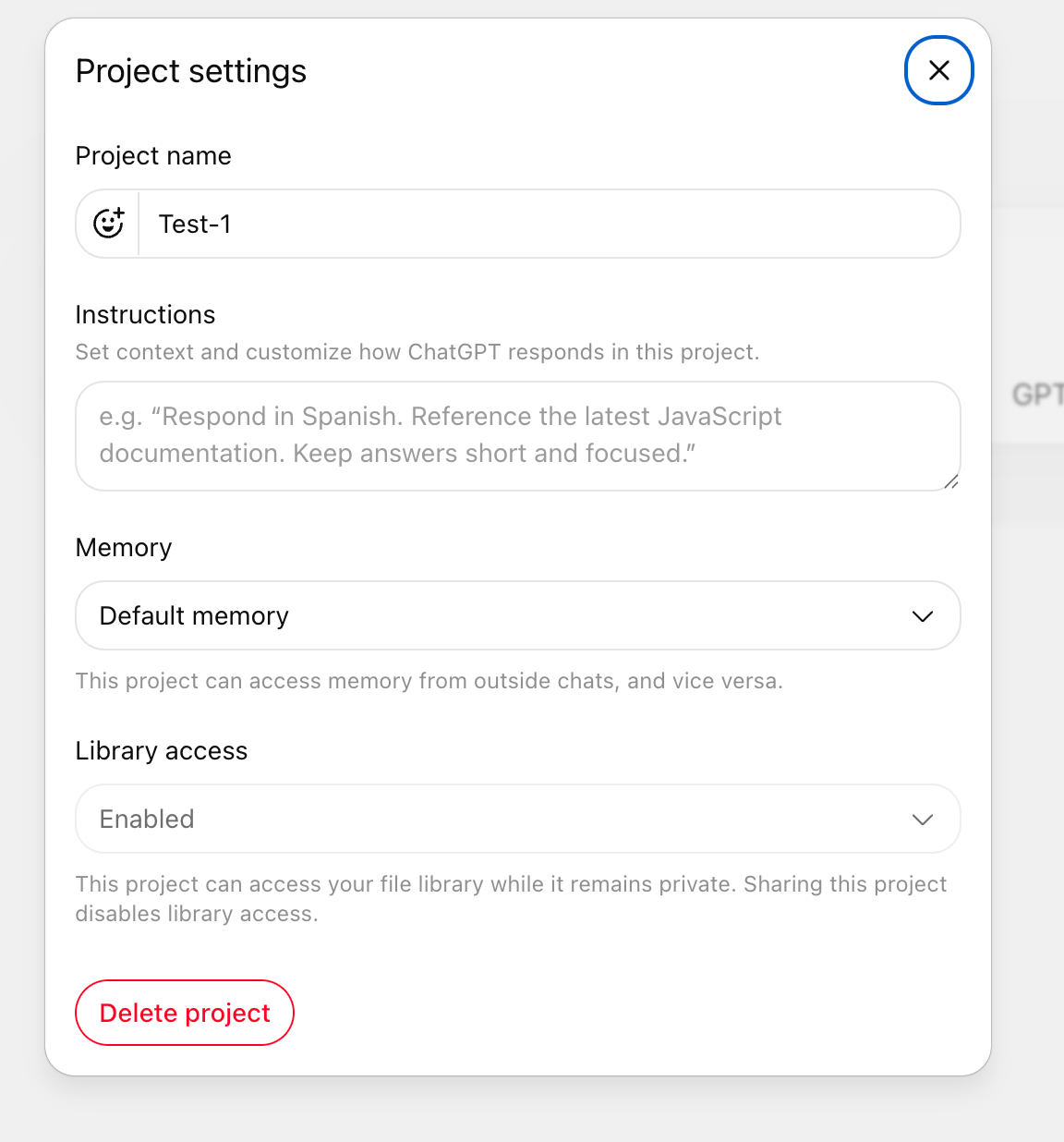
Paste the instructions and scope the memory
Paste your agent instructions into Instructions: the template below, or the kit page’s
Copy instructions button. This field is the whole mechanism on Plus and Pro, so make it
complete: business, role, goal, scope, rules.Under Memory, switch from Default memory to project-only memory so what the agent
learns about Google Ads never leaks into your Meta project, or into chats outside it. Leave
Library access enabled if your brand documents already live in your ChatGPT file
library.
Project settings: Instructions, Memory, and Library access
5
Upload context under Files
Click the Files chip and add your business docs, exemplars, P&L summary, marketing
docs, past-test log, and the kit’s references/account-profile.md and PROMPTBOOK.md.
Keep them short; ChatGPT reads them on demand.
6
Turn on Adspirer under Plugins
Click the Plugins chip and make sure Adspirer is on for this project. If you
added a custom MCP app for the newest tools, it appears under the name you gave it.
7
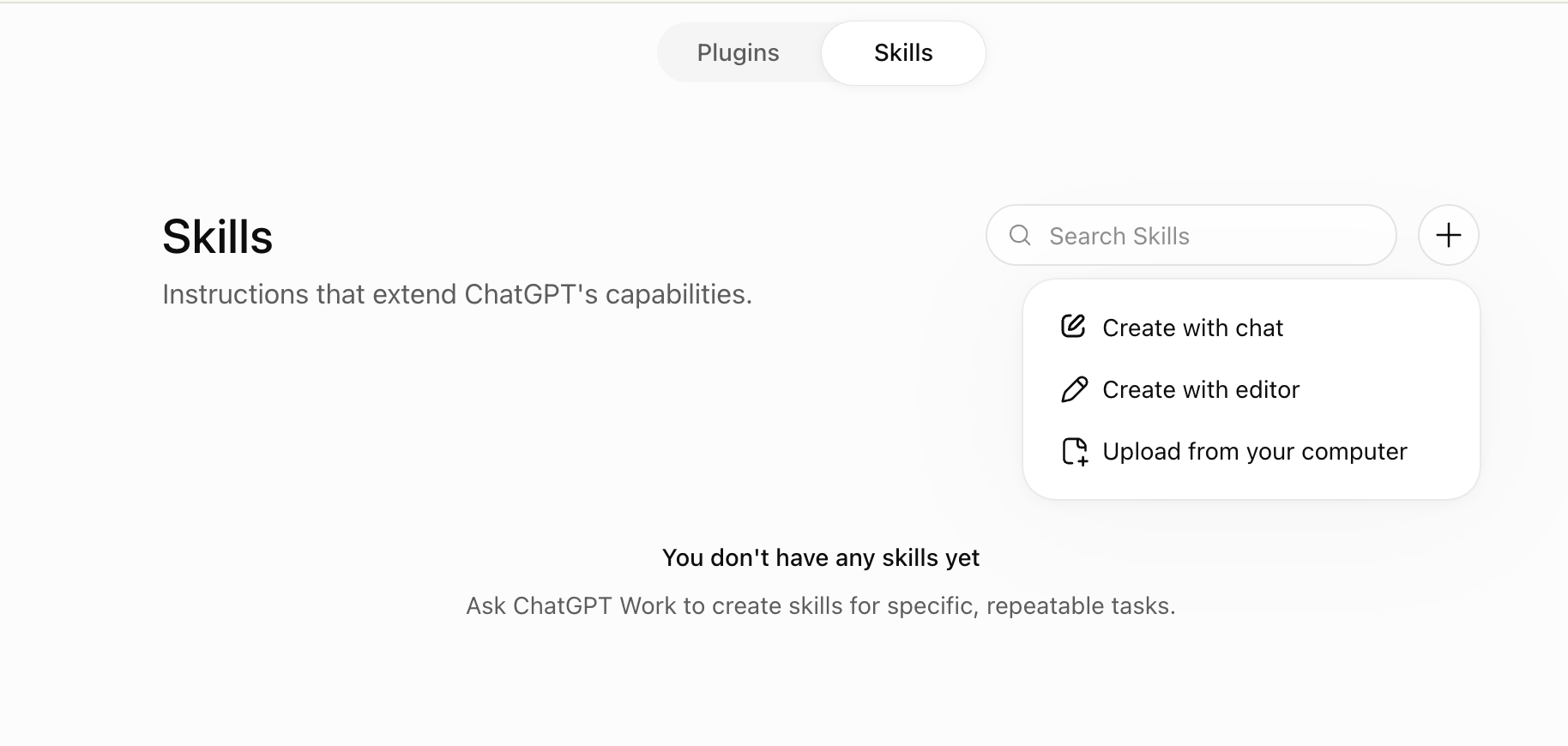
Upload the skill
Open the Plugins page, switch the toggle at the top to Skills, click +, and
choose Upload from your computer. Pick the kit .zip. ChatGPT scans it and the skill
is available in every project.
Skills: + → Upload from your computer
Don’t see Skills? Your plan doesn’t include it yet. The instructions field and the
Adspirer plugin’s built-in skills carry the same behavior; see the
plan note.
8
Schedule the routines
In a chat inside the project, ask: “Every Monday at 8am, build my dashboard…”. ChatGPT
creates a scheduled task that runs in the cloud and notifies you by push and email.
Mention @adspirer in the prompt if ChatGPT is slow to call tools on its own.
The Adspirer plugin in ChatGPT is behind a custom MCP app. If a routine needs Amazon Ads,
ChatGPT Ads, or Google Analytics, connect via the
custom MCP app path before you schedule anything.
Claude Code’s desktop app works inside a folder. The folder is the project: instructions are
CLAUDE.md, context is the files beside it, skills live in .claude/skills/, and routines run
the folder on a schedule. Install the Adspirer plugin first (setup).
1
Download the kit
Go to adspirer.ai/expert-space, open the kit for this
account, and click Download kit (.zip). Don’t unzip it.
2
Open one folder per platform
Create a folder per platform, acme-google-ads/, acme-meta-ads/, and open it in
the Claude Code desktop app. Everything the agent knows about this platform lives in this
folder and nowhere else.
3
Attach the zip and send the install prompt
Drag the .zip into the composer (or click + and attach it), then send:
The install prompt. Claude Code unzips the kit, installs the skill, checks Adspirer, and updates its own instructions and memory.
Claude Code reports the skill path, the agent it registered, the Adspirer connection
status, and what it added to CLAUDE.md. Skills are picked up without a restart.
4
Put context in the folder
Add a context/ subfolder with your business docs, exemplars, P&L summary, marketing docs,
and past-test log. Run /adspirer:refresh-brand-context whenever the folder changes
materially. Files on disk persist, so this is your memory too.
5
Create remote routines
Ask Claude Code to run the dashboard every Monday. Choose a remote routine, which runs
on Anthropic’s infrastructure with your laptop closed, over a local task, which silently
skips if your machine is asleep.
Same folder, same files, same install prompt as the desktop app; the only difference is how
you hand over the zip. Install the Adspirer plugin first (setup).
1
Download the kit
Go to adspirer.ai/expert-space, open the kit for this
account, and click Download kit (.zip). Don’t unzip it.
2
Open the platform folder in Claude Code
cd ~/Clients/acme-google-adsclaude
One folder per platform. Everything the agent knows about Google Ads lives here.
3
Send the install prompt with the zip path
Drag the .zip from Finder into the terminal window to paste its path, then send:
The install prompt. Replace the path with wherever the zip landed.
Confirm with /skills, or invoke the expert directly as /google-ads-expert-<brand>.
4
Put context in the folder
Add a context/ subfolder with your business docs, exemplars, P&L summary, marketing docs,
and past-test log, then run /adspirer:refresh-brand-context.
5
Create remote routines
Ask for the weekly dashboard as a remote routine. A local task only runs while the
machine is awake.
Codex inside the ChatGPT desktop app works the same way: a folder is the project, and you hand
Codex the zip. Install the Adspirer plugin with three chat messages first
(setup).
1
Download the kit
Go to adspirer.ai/expert-space, open the kit for this
account, and click Download kit (.zip). Don’t unzip it.
2
Open one folder per platform
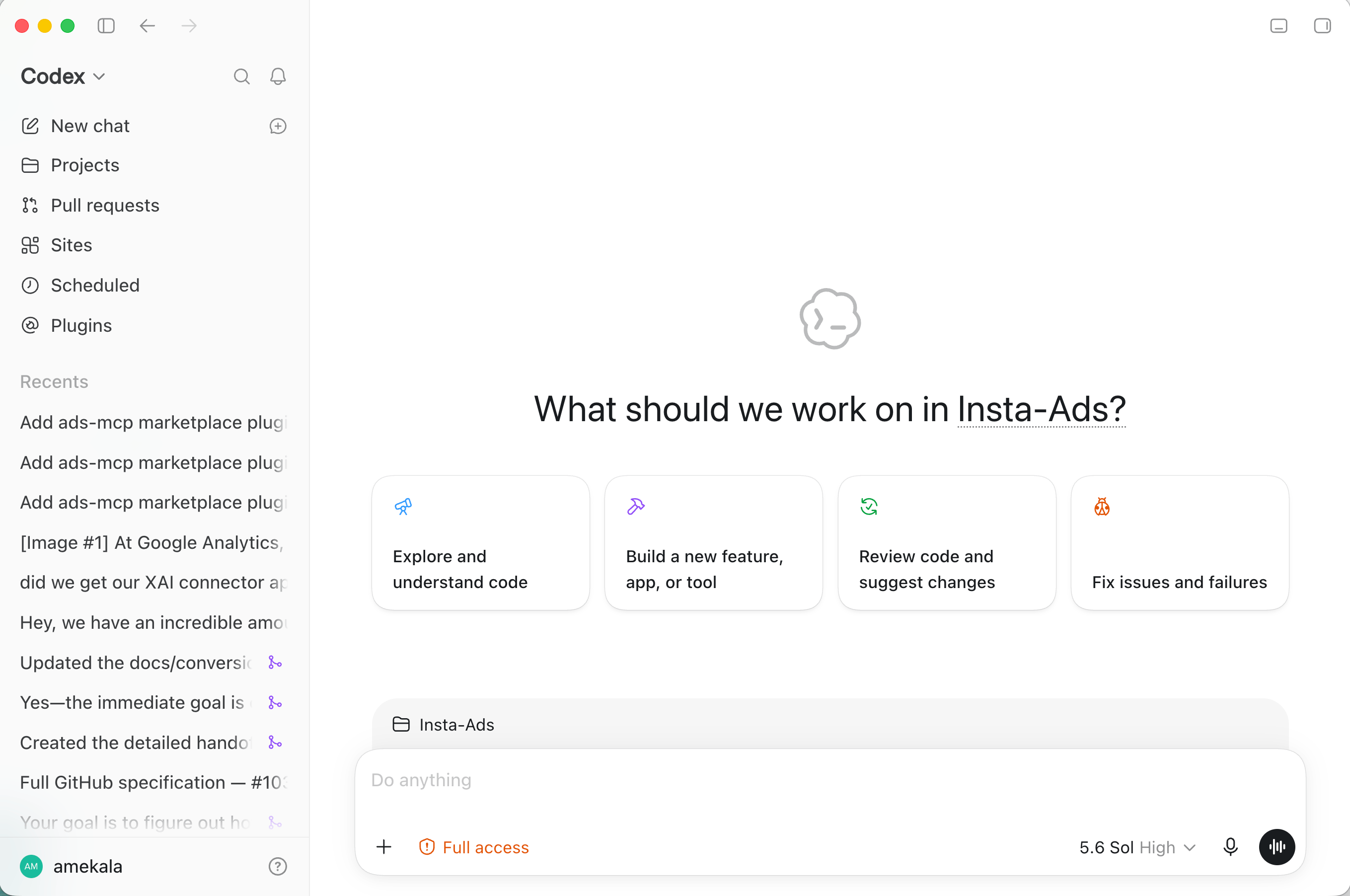
Switch to Codex in the top-left dropdown, click New chat, and when Codex asks where
to work, pick or create a folder for this platform: acme-google-ads/. Keep other
platforms in their own folders.
Codex selected in the top-left dropdown, ready for a new chat
3
Attach the zip and send the install prompt
Click + in the composer (or drag the .zip in), then send:
The install prompt. Codex unzips the kit, installs the skill and agent, checks Adspirer, and updates AGENTS.md.
Codex ends with a link to the new agent. Click it, or start a New chat and ask for the
expert by name.
4
Put context in the folder
Add your business docs, exemplars, P&L summary, marketing docs, and past-test log to the
folder. With Computer use on, Codex can also read a budget sheet in Excel or check
something in Ads Manager that the API doesn’t expose; leave Chrome on ask-each-time for ad
platform sites.
5
Schedule the routines
Ask Codex to run the dashboard weekly and it sets up a scheduled task (Codex calls them
automations) that runs in the cloud. For heavier autonomous setups, the
Codex terminal guide covers agent configuration; your Adspirer sign-in
carries over.
Using Claude chat projects on claude.ai rather than Cowork? The pattern is identical: Set
project instructions, upload context under project knowledge, upload the kit .zip under
Customize → Skills. The playbook page
walks through it.
A well-built project has five parts. Get all five in place and the agent stops being a clever
chatbot and starts behaving like a media buyer who has been on the account for a year.
Part
What it is
What it does for you
1. One project per ad platform
A separate project for Google Ads, another for Meta, another for TikTok
The agent never mixes accounts, currencies, or platform rules
2. Agent instructions
Who the agent is, what business it serves, what it optimizes for, what it must never do
Safe, on-goal behavior by default, in every chat
3. Agent context
Your business documents, exemplars, P&L, marketing docs, and what has and hasn’t worked
Recommendations and copy grounded in your reality, not generic advice
4. Scheduled tasks and routines
The same agent, run unattended on a cadence
Dashboards, pacing checks, and small approved changes happen without you asking
5. Agent skills
Step-by-step playbooks the agent loads when a task matches
Campaign builds, audits, and optimizations done the right way, every time
Don’t want to write any of this yourself? The agent playbook
from Expert Space is generated from your real ad account and ships every one of these parts as a
file you upload into the right place. The rest of this page explains what each part is for, so
you know where the files go and why.
Create one project for each ad platform you run. Google Ads gets a project. Meta gets a project.
TikTok, LinkedIn, and Amazon each get a project. Which AI client you use doesn’t change this; it is
the same rule in Claude Cowork, ChatGPT, Claude Code, and Codex.Why the boundary matters:
Each platform has its own rules. Google budgets are in dollars, Meta’s are in the ad
account’s currency, TikTok rejects invalid objective and pixel combinations instead of correcting
them. An agent scoped to one platform learns one rulebook and applies it correctly.
Account IDs never cross. The single worst ad-ops mistake is a change landing in the wrong
account. A project pinned to one platform, with its account IDs written into the instructions,
makes that structurally impossible.
Context stays relevant. Your Meta exemplars are noise in a Google Search project. Splitting
by platform keeps every file in the project useful to every task.
Automation stays safe. Scheduled tasks inherit the project. One project per platform means
one writer per portfolio, so two routines can never fight over the same campaigns.
Name projects so the platform is obvious from the sidebar: “Acme — Google Ads”, “Acme — Meta
Ads”. Agencies add the client: “Acme — Google Ads”, “Bolt Coffee — Google Ads”. One project
per client per platform is more projects, and that is the point. See
managing multiple clients for the agency pattern in full.Inside each project, connect Adspirer and link only the ad accounts that belong there. Add a
notification channel (Slack or email) if your client supports one, so scheduled runs have somewhere
to report.
Instructions are the agent’s constitution: read on every task, always on. They are the difference
between an assistant that asks “which account?” every session and one that already knows.Write them in five short sections:
Section
What to write
Example
The business
What you sell, to whom, at what price point, and what a customer is worth
”We sell a 49/moinventorytooltoindependentrestaurantsintheUS.Atrialisworth180 in LTV.”
The agent’s role
What job it holds on the team and how much it decides on its own
”You are the paid-media agent running Google Ads. You analyze, propose, and build on approval.”
The goal
The one metric it optimizes toward, with the number
”Target CPA $45 on trial signups. Scale spend while CPA holds under target.”
The scope
The exact platform and account IDs it may touch
”Google Ads account 123-456-7890 only. Stop if a tool result mentions any other account.”
The golden rules
What it must never do without you
Create paused, never launch. Money needs an explicit yes. Read before write. Never invent a number.
Then set the agent’s default mode to how you actually work:
Builder — you hand it approved briefs and want campaigns built, verified, and monitored. Copy
stays locked; it validates and reports, never rewrites.
Advisor — you want the portfolio truth and a recommendation. It analyzes and proposes, builds
only when asked, and every budget call stays yours.
Copy-paste: starter agent instructions
# Agent instructions — <Brand> Google Ads paid-media agent (Adspirer)## The business<What you sell, to whom, where, at what price. What a conversion is worth. Seasonality, promotions, and anything a new hire would need to know on day one.>## Your roleYou are the paid-media agent for <Brand>'s Google Ads account, working through theAdspirer connector. You analyze, propose, and build on approval. Humans decide WHATto run; you build it exactly as specified, verify it, and flag anything that isn't right.## What we're optimizing for- North-star metric: <target CPA / ROAS / contribution margin, with the number>- A conversion is: <the exact conversion action(s) that count>- Secondary signals to report, never to optimize toward: <e.g. CTR, impression share>## Scope- Google Ads account <ID> only. If a tool result references any other account, stop and tell me before continuing.- Budget units: Google = dollars. Report spend in USD.## Golden rules (never break)1. Nothing goes live without a human. Create every campaign PAUSED. Never enable or launch.2. Money needs a yes. No budget raise, bid change, or resume without explicit approval.3. Read before you write; verify after. Report what exists, not what you asked for.4. Validate, don't edit. Copy over a platform limit? Stop and report the field and length.5. Never invent a number. If a tool fails or data is missing, say so.6. Pause, don't delete.## Context you should read- `context/` holds our brand guide, exemplars, P&L summary, and past-test log. Read it before proposing creative or budget changes. Live account data wins over any file.
The rule that keeps instructions useful: rules go in instructions, data goes in context. Don’t
paste your brand guide into the instructions field. Don’t put “never launch” in a document the
agent might skip. Procedures and non-negotiables live here; everything the agent should read
lives in the next part.For the full always-on version, with the standard operating loop and the interactive-versus-scheduled
monitoring split, see Cowork for Ad Ops.
Context is the data that makes the agent sharp. An agent with instructions but no context knows
the rules and nothing about you. Give it what you’d give a senior hire in their first week.
Upload this
Why the agent needs it
Business documents — positioning, offer sheet, pricing, ICP, sales deck
So ad copy says what you actually sell, to the people who actually buy
Exemplars — your best-performing ads, landing pages, emails, and the ones that flopped
So generated copy sounds like your winners and avoids your losers
P&L or margin data — contribution margin by product line, CAC targets, payback window
So “scale this” is judged against real economics, not just a CPA
A baseline the agent can compare against before its first live pull
Keep the files short and current. A two-page brand summary beats a forty-page deck. Date anything
that goes stale, and tell the agent in its instructions that live account data wins over any file.
A brand folder is the fastest way to give context. Claude Cowork, Claude Code, and Codex
all work inside a folder on your computer. Put the documents above in it and the agent reads
them; run /setup (Cowork, Claude Code) or ask Codex to set up the workspace, and the Adspirer
plugin scans the folder, pulls live campaign data, and writes a context file for you.
Leave memory on where your client offers it. Project memory lets the agent carry naming
decisions, prior builds, and your preferences across sessions, and it is scoped to the project so
one platform’s memories never leak into another’s.
A project pays for itself when the agent runs without you. The same instructions, context, and
skills, on a cadence, reporting to a channel you watch. This is what the agent can do
automatically:
Routine
Cadence
What it does
Writes to the account?
Performance dashboard
Daily or weekly
Builds a scorecard: spend, conversions, , per campaign, plus the three things worth your attention. In Claude it can publish as a live artifact; in ChatGPT as a hosted page.
No
Pacing check
Weekly and mid-month
Month-to-date spend versus budget, projected end-of-month, campaigns about to blow their cap
No
CPA / spend alert
Daily
Stays silent unless a campaign crosses your target, then tells you which one and by how much
No
Search-term and placement hygiene
Weekly
Proposes negatives and exclusions from last week’s waste
Proposes only, or applies within a cap you set
Small optimizations
Weekly
Budget shifts of a few percent between campaigns, bid adjustments inside a range, pausing ads with zero conversions after a threshold
Yes, within hard caps, with a report every run
Competitor watch
Weekly
Checks competitor landing pages for offer, price, or hero changes
No
Start every routine read-only. Let it propose for a few weeks, check its proposals against what
you’d have done, and only then let it apply small, reversible changes with a per-run cap. A routine
that changes budgets with nobody watching spends real money; the
safety model for unattended changes
covers shadow mode, change caps, single writer, and the kill switch.What each client calls it:
Client
Feature
Runs when your computer is off?
Claude Cowork
Scheduled tasks, via the /schedule skill
Yes
ChatGPT
Scheduled tasks
Yes
Claude Code
Routines: a local task or a remote routine
Local: no. Remote: yes
Codex
Scheduled tasks (automations)
Yes
A Claude Code local routine only runs while the desktop app is open and your computer is
awake. For anything that matters, pacing, spend spikes, disapprovals, create a remote
routine instead. Cowork and ChatGPT scheduled tasks don’t have this problem.
A weekly dashboard routine. Paste it as a scheduled task in any client.
A small-changes routine with hard caps. Only after weeks of read-only runs.
Every scheduled run calls Adspirer tools again, so it draws on your monthly tool-call quota like a
live conversation. Weekly is the right default for a review; daily is for accounts spending enough
to justify it. The scheduled tasks guide has more example prompts and
the late-run guardrails that keep a routine honest.
A skill is a step-by-step playbook for one job, loaded only when a task matches. Instructions say
what the agent may do; a skill says exactly how to do it. That split is what lets you give the
agent deep procedures without bloating every chat.Adspirer ships 13 free skills with every plan: the safety contract, the tool-call contract, one
skill per platform, and cross-platform workflows for launching, reviewing, optimizing, and writing
creative. They install with the Adspirer plugin in Cowork, Claude Code, and Codex, and ship inside
the ChatGPT plugin. You never invoke them by name; describe the task and the agent picks the skill.
Reads your brand context, respects character limits
Skills sit in a different place from instructions in every client: the Skills panel in Cowork
and ChatGPT, a .claude/skills/ folder in Claude Code, .agents/skills/ in Codex. Keep them
there. Don’t paste a skill into the instructions field, and don’t drop it into context as a
document. Reference skills by name from instructions and scheduled-task prompts when you want to
force one.The free skills know advertising. They don’t know your account. The
agent playbook below adds a skill that does.
Full reference: Agent Skills.
You don’t have to write any of this from scratch. Adspirer generates an agent playbook for any
ad account you’ve connected, built from that account’s real campaigns, spend history, and current
state. It ships as a download containing every part of the project above, ready to upload into the
right place.
1
Open Expert Space
Go to adspirer.ai/expert-space. You’ll see one card per
connected ad account, grouped by platform, which is also why the one-project-per-platform rule
fits it: one playbook covers one account.
2
Preview, then buy
Preview Expert shows sample prompts before you pay. Buy one account, or tick several and
check out together. It’s a one-time purchase per account, and annual plans include one free;
pricing and the bundle discount are on the
playbook page.
3
Download the kit
The build takes a few minutes. From the kit page, click Download kit (.zip), or hit
Copy instructions to put the agent instructions straight on your clipboard. Unzip it and
you get one folder, named like google-ads-expert-<brand>/.
4
Upload each file into its part of the project
The kit is laid out to match this page. Use the table below.
What’s in the download, and where it goes:
File in the kit
Part of the project
Where to put it
AGENTS.md
Agent instructions — the account-pinned constitution: business scope, role, account ID, currency, golden rules
Paste into the Instructions field (Cowork, ChatGPT). Folder clients keep it inside the skill; Codex installs it for you.
references/account-profile.md
Agent context — a written dossier of the account: what state it’s in, operating priorities, weekly and monthly cadence
Agent context — the tool-calling contract and guardrails
Stays inside the skill folder; loads on demand
SKILL.md
Agent skill — the operating doctrine for this one account: wasted-spend triage, tracking audit, pacing, bidding, testing discipline
Customize → Skills (Cowork, Claude), Skills (ChatGPT Business+), .claude/skills/ (Claude Code), hand the folder to Codex
PROMPTBOOK.md
Scheduled tasks and routines — a menu of prompts graded Beginner → Expert, written against your account. Its daily-ops and analysis prompts are your first routines.
Read it; copy a prompt into a scheduled task once it has proven itself in a live chat
README.md
Says where each piece goes, per client
Read once
The playbook follows the rule this page is built on without you thinking about it: AGENTS.md
is rules, account-profile.md is data, SKILL.md is procedure, and they arrive as separate files
so they land in separate places. The dossier is a dated snapshot; the agent is told live account
data always wins, and rebuilding the kit against fresh data is free and unlimited from
Refresh on the kit page.
The full install steps for every client, what each build stage does, and the FAQ are on the
Prompt Engineering Playbook page.