

How It Works
Cursor’s agent mode uses an agentic loop: you describe a task, it reasons, calls tools, reads results, and repeats. When your task involves advertising, Cursor delegates to the Adspirer subagent — which has its own prompt, memory, skills, and MCP tools.What Makes Cursor Different
Two things no other client gives Adspirer:- Rules (
.mdcfiles) — they fire on context, not on a command. Mention a campaign and the brand context and safety workflow load themselves. - 14 separate skills — one per platform and one per workflow, so the agent loads the TikTok pixel rules when you’re on TikTok and nothing else.
Install
1
Open Customize and install Adspirer
In Cursor, open Customize in the sidebar, search adspirer, select Install, and choose user scope (every project) or project scope (this folder only).From chat,
/add-plugin adspirer does the same thing.2
Sign in
The first tool call opens Adspirer’s sign-in page. Sign in, authorize, and connect your ad accounts at adspirer.com/connections.
What Gets Installed
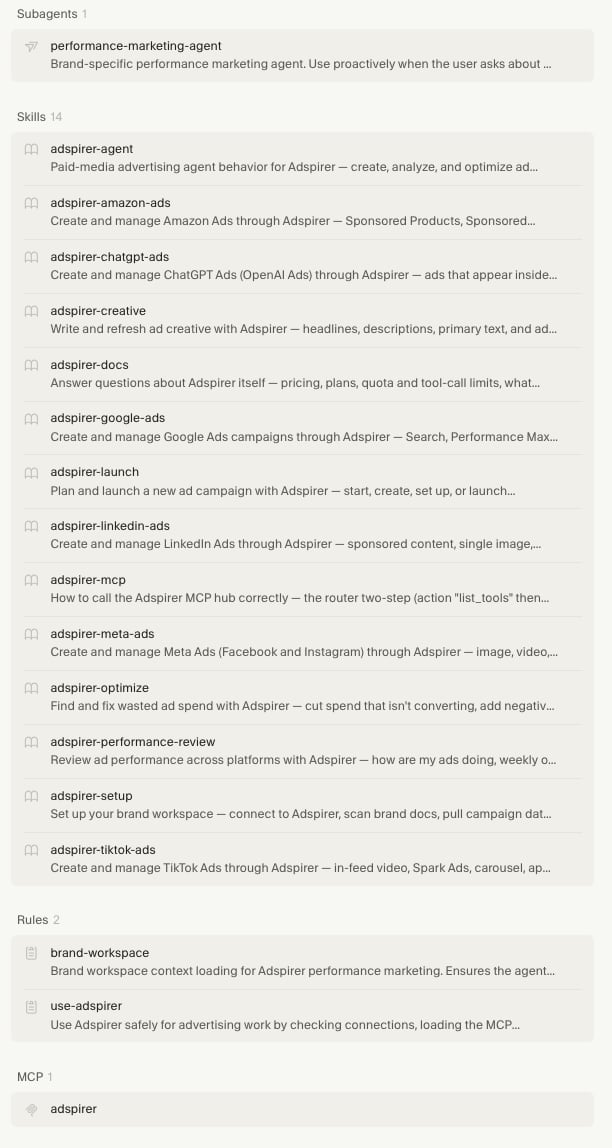
The Adspirer plugin on the Cursor Marketplace — 1 subagent, 14 skills, 2 rules, 1 MCP server
Nothing is copied into
~/.cursor/ by hand any more. The old install.sh script is retired — if you ran it, delete the adspirer-* folders it left in ~/.cursor/skills/, ~/.cursor/agents/, and ~/.cursor/rules/ so they don’t shadow the plugin.The 14 Skills
Skills appear under Agent Decides in Customize. Cursor matches them from what you ask; the/ command forces one.
Behavior and contract
Workflows
Platforms
Each platform skill carries the traps that account for most failures on that platform: TikTok’s pixel-placement rule and the unsupported single-image ad, Meta’s required Facebook page ID, LinkedIn’s mandatory campaign group, Google’s asset-bundle expiry and ad-group-ID mismatch.
How Skills Work in Cursor
- Skill descriptions are always in context — Cursor knows what’s available
- Full skill content loads when you invoke it or Cursor matches it automatically
- You can invoke directly with
/adspirer-*or just describe what you want
Cross-platform wasted spend audit with savings estimate.
Sign up for Adspirer — free to start
15 free tool calls/month. No credit card required. Connect your ad accounts in 2 minutes.
The Two Rules
Rules are.mdc files that fire on context instead of on a command. You can toggle each between Always, Agent Decides, and Manual under Customize → Rules.
brand-workspace
Auto-loads brand context on every advertising task:- Reads
BRAND.mdbefore answering any advertising question - Reads
STRATEGY.mdfor active directives, and treats them as binding - Reads past decisions from
.cursor/memory/performance-marketing-agent/MEMORY.md - Bootstraps a new workspace when
BRAND.mddoesn’t exist - Pulls fresh data rather than answering performance questions from memory
- Updates context files when something significant changes
use-adspirer
Enforces workflow safety automatically:- Always checks connections first
- Read-before-write enforcement
- User confirmation before spend-affecting actions
- Campaign creation in PAUSED status
- Strategy directive checks before campaign creation
- Mandatory ad extensions for Google Ads campaigns
- Post-creation verification before reporting success
Rules vs Skills
Rules and skills work together. The rule ensures safety; the skill provides the detailed workflow.
Without rules, you say “create a Google Ads campaign” and Cursor might jump straight to
create_search_campaign — which fails because there’s no keyword research, no asset validation, no strategy check.With rules, the same prompt triggers the full workflow automatically: connection check → strategy load → keyword research → asset validation → confirmation → creation → extensions → verification.Context Files
The agent uses three persistent files. Cursor’s isBRAND.md (vs Claude Code’s CLAUDE.md).
BRAND.md — Brand Context
Created by/adspirer-setup. Contains brand overview, voice, audiences, connected platforms, budgets, KPI targets, and performance snapshot.
If you already have a
BRAND.md that isn’t an Adspirer workspace — a software project’s instructions, say — the agent leaves it untouched and tells you so, rather than writing over it.
STRATEGY.md — Strategic Decisions
Persists directives across sessions:MEMORY.md — Past Decisions
Located at.cursor/memory/performance-marketing-agent/MEMORY.md. Tracks campaign actions, optimization results, and learnings.
The Agent Loop
When you invoke/adspirer-performance-review in Cursor:
1
Rule activates
brand-workspace fires, loading BRAND.md and STRATEGY.md into context.2
Skill loads
Cursor matches the performance review skill and loads its full workflow instructions.
3
Agent spawns
The performance marketing subagent starts with brand context, strategy, and memory.
4
Data pull
For each connected platform, calls performance and wasted spend tools via Adspirer MCP.
5
Strategy check
Compares campaign data against
STRATEGY.md. Flags “Strategy Drift” items.6
Results
Presents a unified scorecard with recommendations and top 3 actions.
Web Research
Cursor’s agent has access toWebSearch and WebFetch for competitive research. Before creating any campaign, the agent:
- Crawls your website for positioning, pricing, and value propositions
- Searches for and crawls competitor websites
- Combines web data with Adspirer data (search terms, keyword volumes)
- Presents a research brief before building your campaign
Safety Rules
Comparison with Other Clients
FAQ
Do I need the rules to use Adspirer?
Do I need the rules to use Adspirer?
No, but they make everything smoother. Without rules, you need to be more explicit (“first check my connections, then research keywords”). With rules, safety checks and context loading happen automatically.
Can I edit the rules and skills?
Can I edit the rules and skills?
The plugin’s copies update with the plugin, so edit them by adding your own alongside. Put project rules in
.cursor/rules/ and personal skills in ~/.cursor/skills/ — yours load next to Adspirer’s. To change a default outright, fork the plugin repo and load it from ~/.cursor/plugins/local.What's the difference between the subagent and Composer?
What's the difference between the subagent and Composer?
Cursor’s Composer is the main agent mode for coding tasks. The Adspirer subagent is a specialized agent that Composer delegates to when advertising tasks come up. The subagent has its own context, so ad workflows don’t bloat your coding session.
Can I use Adspirer in Cursor without the agent?
Can I use Adspirer in Cursor without the agent?
Yes. The agent is one part of the plugin, and the 400+ tools work from any Cursor chat whether or not the subagent is invoked. Install the plugin from the Cursor Marketplace either way. It’s Verified by Cursor, and it’s the supported way to connect. Don’t add the MCP server by hand. You’d lose brand awareness, workflow enforcement, strategy persistence, and memory, and a second copy of the server duplicates every tool.
Is the plugin open source?
Is the plugin open source?
Yes — Adspirer/adspirer-cursor-plugin, MIT licensed. Cursor requires marketplace plugins to be open source and reviews every update before it ships.
Related Documentation
- Cursor Setup — installation guide with screenshots
- Grok Bot Setup — the same plugin, running in the cloud
- Claude Code Agent — How Adspirer works in Claude Code
- Codex Agent — How Adspirer works in Codex
- Performance Marketing Agent — Architecture overview
- Skill Reference — All skills with invocation details
- Prompt Engineering Playbook — A custom skill, account dossier, and prompt book generated from your own ad account ($39 one-time, one free on annual)